
Web Design That Converts – Turn Visitors Into Revenue
Web design is not about aesthetics—it is about performance. Your website is your most important sales asset, and if it is not designed to convert, it is actively costing you money. Users make decisions in seconds. If your site feels outdated, slow, or confusing, they leave and never come back. Thinkit Media delivers high-performance web design engineered to drive engagement, trust, and conversions.
First Impressions Decide Everything
Research shows that 75% of users judge a business’s credibility based on its website design (Stanford Web Credibility Research). That means your design is either building trust or destroying it before your sales pitch even starts.
Thinkit Media designs modern, conversion-focused websites that immediately communicate professionalism, authority, and clarity.
Web Design Directly Impacts Conversions
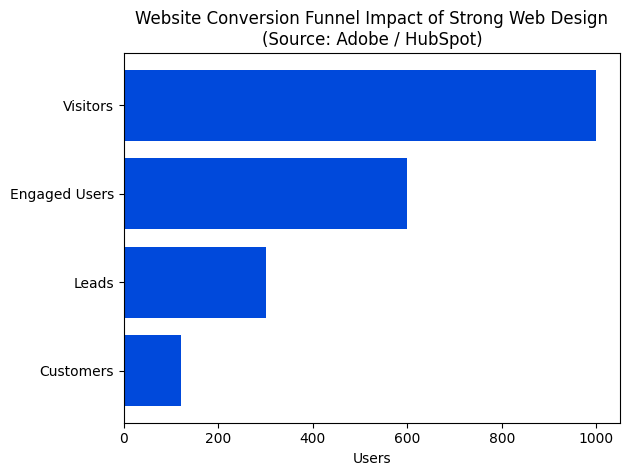
Strong web design dramatically improves every stage of the conversion funnel. According to Adobe and HubSpot, companies that prioritize UX and design see conversion improvements of up to 200%, while UX-focused optimization alone can increase conversions by up to 400%.
A poorly designed website leaks traffic. A high-performance site captures attention, guides behavior, and turns visitors into customers.
UX Is the Foundation of Revenue Growth
User experience is not optional. Google data shows that 88% of users will not return after a bad website experience. Navigation confusion, slow load times, and poor mobile optimization kill trust instantly.
Thinkit Media builds websites with intentional user flows that reduce friction, increase engagement, and move users toward action.
The Pyramid of High-Performance Web Design
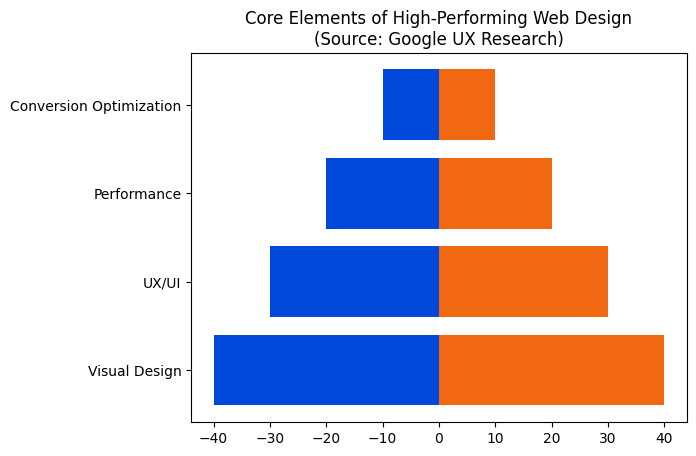
High-converting websites are built in layers. Visual appeal draws attention, UX keeps users engaged, performance ensures speed and stability, and conversion optimization turns interest into action. Remove any layer, and the entire system fails.
Thinkit Media engineers websites from the ground up using this exact hierarchy—ensuring every layer supports growth.
Speed and Performance Are Non-Negotiable
Page speed is a ranking factor and a conversion killer. Google reports that 53% of mobile users abandon a site if it takes longer than three seconds to load. Every second of delay reduces conversions by approximately 7%.
Thinkit Media optimizes performance through clean code, modern frameworks, and Core Web Vitals optimization—because speed equals revenue.
Mobile-First Design Is Mandatory
More than 60% of website traffic comes from mobile devices, and Google now ranks websites based on their mobile experience first. If your site is not mobile-optimized, you are invisible where it matters most.
Thinkit Media designs mobile-first experiences that perform flawlessly across devices.
Design Builds Trust—and Trust Drives Sales
Users do not buy from websites they do not trust. Consistent branding, intuitive layouts, and clear messaging dramatically increase perceived credibility. Well-designed websites convert visitors at significantly higher rates than outdated or cluttered designs.
Thinkit Media aligns design with brand authority, ensuring your website positions you as the clear choice in your market.
Why Thinkit Media Web Design Wins
Thinkit Media delivers web design built for performance, including:
- Conversion-focused UX/UI design
- Mobile-first and responsive layouts
- Speed and Core Web Vitals optimization
- SEO-ready site architecture
- Clear conversion paths and CTAs
- Scalable design systems for growth
This is not a template design. This is engineered performance.
The Cost of Bad Web Design
An underperforming website quietly drains revenue every day. Lost trust, lost traffic, and lost conversions add up fast. Your competitors are investing in better digital experiences—and winning because of it.
Final Word
Web design is your digital foundation. When done right, it multiplies the effectiveness of SEO, content marketing, and paid traffic. When done wrong, it sabotages everything.
Thinkit Media builds high-conversion websites designed to dominate, convert, and scale. If you want a website that works as hard as you do, it’s time to upgrade.
Frequently Asked Questions
Well-designed website forms make it easy for visitors to take action while minimizing friction. Start with empathy: think about why a user is on the page, what information you truly need, and how the form fits into the overall task. Small choices in layout, language, and feedback dramatically affect completion rates.
Core principles
- Ask only for essentials. Each additional field increases abandonment—limit yourself to must-haves.
- Use clear labels and helpers. Place labels above fields and use succinct helper text for format expectations.
- Design mobile-first. Single-column layouts, large touch targets, and input types (email, tel) reduce friction on phones.
- Provide instant feedback. Inline validation and clear error messages help users correct mistakes without losing progress.
- Guide the user to completion. Use a single, strong call-to-action, explain benefits, and show progress for multi-step forms.
- Respect privacy and trust. Explain why you need data, show a brief privacy note, and minimize required personal fields.
Quick checklist
- Define the form’s goal and map each field to that goal.
- Group related inputs and mark optional vs required.
- Optimize for speed: enable autocomplete and reduce typing.
- Test with real users, track drop-off points, and iterate.
If you want a practical review of your site forms, Thinkit Media can audit usability and provide prioritized changes that increase conversions while keeping the experience human and respectful.
An effective button design guides users to take action while fitting your site’s visual hierarchy. Good buttons are clear, visible, and usable on any device. They reduce friction, improve conversion, and communicate trust through consistent styling and accessible behavior.
Key principles
- Clarity: Use concise, action-first labels like “Buy now” or “Request demo” so intent is obvious.
- Hierarchy: Make the primary action visually distinct from secondary actions with color, size, or weight.
- Affordance: Buttons should look clickable—rounded corners, shadows, and consistent padding help.
- Accessibility: Ensure high color contrast, keyboard focus styles, and readable text for all users.
- Touch targets: Keep targets large enough for touch (roughly 44–48px minimum).
- Microcopy: Use supporting text sparingly to reduce hesitation (ex: “Free trial — no card required”).
Practical tips to implement
- Prioritize one clear primary button per view and use a secondary style for other actions.
- Choose a high-contrast color that aligns with your brand and test it on light and dark backgrounds.
- Use consistent spacing and padding so buttons feel balanced across the site.
- Add subtle states: hover, active, disabled, and focus to communicate interactivity.
- A/B test label copy and placement to see what converts best for your audience.
- Include icons only when they clarify the action, not to decorate.
If you want a review tailored to your pages, Thinkit Media can audit button hierarchy, accessibility, and conversion impact to recommend focused improvements.
An effective CTA (call-to-action) guides visitors to the next step while feeling natural and trustworthy. Focus on clarity, visual prominence, and context so users immediately understand the benefit of clicking.
CTA design checklist
- Use clear, action-first copy. Start with a verb and state the benefit: “Get my free guide” or “Start your trial.” Keep it short and specific.
- Prioritize one primary action. Each page should have a single dominant CTA; secondary actions can be smaller and less prominent.
- Make it visually distinct. Use contrast, size, and whitespace so the CTA stands out from surrounding content without overwhelming the page.
- Place CTAs near relevant content. Position buttons where users naturally decide to act: above the fold for primary offers and after persuasive copy for conversions.
- Optimize for mobile and accessibility. Ensure touch targets are large enough, labels are descriptive, and color contrast meets accessibility guidelines.
- Use microcopy for reassurance. Add small details like “No credit card required” or estimated time to reduce friction.
- Test and measure. Run A/B tests on copy, color, and placement and track click-through rate and conversion metrics.
Small changes often yield big gains. If you want a focused CTA audit or design help, Thinkit Media can review your pages and suggest prioritized, testable improvements tailored to your site’s goals.
Design A/B tests that answer one clear question
Good A/B testing starts with empathy: imagine the visitor, the obstacle they face, and the one change most likely to help. Keep tests focused so results are actionable and tie every variation to a measurable business goal.
- Define the goal: choose a single primary metric (conversion rate, signup rate, micro-conversion).
- Form a hypothesis: write a short statement like “If we simplify the signup form, more users will complete it.”
- Design controlled variants: change one element at a time—headline, CTA, layout, image—or run a planned multivariate test if needed.
- Estimate sample size & duration: use baseline conversion and expected uplift to calculate how long to run the test; don’t stop early.
- Segment & validate: review mobile vs desktop, traffic sources, and ensure no tracking gaps.
- Analyze and iterate: evaluate statistical significance, look for practical impact, then implement winners and plan follow-up tests.
Practical design tips:
- Prioritize high-impact elements (CTA copy, page layout, form length).
- Keep visuals realistic so user behavior is natural.
- Mind performance and accessibility—don’t trade speed for aesthetics.
If you want a pragmatic testing plan or help running experiments, Thinkit Media can design, implement, and analyze A/B tests tailored to your website goals.
Optimizing a landing page in website design means making the page clear, fast, and focused so visitors take the one action you want. Below are practical, design-centered steps you can apply right away to improve conversions and user trust.
Essential steps
- Clarify the single goal. Choose one conversion event (signup, download, purchase) and design every element to support that single objective.
- Create an immediate, benefit-led headline. The headline and subheadline above the fold must explain value in plain language so users know what to expect.
- Establish strong visual hierarchy. Use size, color, and whitespace to guide the eye from headline to supporting copy to the call to action.
- Make the CTA unambiguous and prominent. Use contrasting colors, clear verbs, and place it where users naturally pause; limit CTAs to one primary action per page.
- Reduce friction in forms. Ask only for essential fields, use inline labels, and offer social or single-click options when appropriate.
- Prioritize speed and accessibility. Compress images, defer noncritical scripts, and ensure readable fonts and keyboard navigation for all users.
- Design mobile-first. Buttons should be thumb-friendly and layouts should stack logically on smaller screens.
- Use trust signals and social proof. Include concise testimonials, client logos, or security badges without crowding the design.
- Run focused A/B tests. Change one variable at a time—headline, CTA color, or image—and measure real user behavior before adopting winners.
- Measure and iterate. Use analytics and heatmaps to find drop-off points and prioritize fixes that improve the funnel.
Start with headline, CTA, and load speed for the fastest wins, then iterate with tests. If you want professional design and testing help, Thinkit Media can assist with visual refinement, copy alignment, and analytics implementation.
Quick overview
Designing an effective subscription website means making value obvious, minimizing friction at signup, and creating habits that keep members coming back. Think like a subscriber: lead with benefits, make pricing and trials crystal clear, and focus on a smooth, trust-building experience from first visit to renewal.
Design checklist
- Clear value proposition: Put a concise benefit statement and the primary call-to-action above the fold so visitors immediately understand what they get.
- Simplified pricing: Show plan differences with easy comparisons, highlight the recommended plan, and avoid hidden fees that break trust.
- Seamless onboarding: Use progressive profiling, guided tours, and a friction-free checkout flow to reduce drop-off during sign-up.
- Mobile-first and performance: Fast pages and responsive layouts are essential—slow sites kill conversions.
- Secure payments and trust signals: Display secure payment badges, clear refund policies, and social proof to reassure users.
- Content gating strategy: Balance free previews with gated content to demonstrate value without frustrating prospects.
- Retention-focused UX: Make renewals, upgrades, and cancellations easy; surface personalized content and reminders to boost lifetime value.
- Measure and iterate: Track conversion funnels, churn reasons, and A/B test key pages to improve over time.
Next steps
If you want hands-on support with design, conversion copy, or checkout UX, Thinkit Media can help evaluate your current site and implement a roadmap that increases signups and retention.
Quick overview
Effective B2C website design turns casual visitors into customers by focusing on clarity, speed, trust, and simple paths to purchase. At Thinkit Media we design with the buyer’s mindset first: what questions do they have, how can we remove friction, and how do we build confidence quickly?
Focus on these essentials:
- Clear value proposition — a concise hero message that explains what you sell and why it matters within seconds.
- Mobile-first, fast performance — optimize images, minimize scripts, and aim for under 3-second load times so mobile shoppers don’t bounce.
- Simple navigation and search — intuitive categories, filters, and a visible search box to help users find products quickly.
- High-quality visuals and concise copy — strong product photography, scannable descriptions, and persuasive microcopy that answers buyer concerns.
- Trust signals and transparency — reviews, secure checkout badges, clear shipping/return info, and accessible contact options.
- Clear CTAs and streamlined checkout — visible calls-to-action and a minimal, predictable purchase flow to reduce drop-off.
Also prioritize accessibility, SEO-friendly content, and analytics-driven testing so improvements are measurable. We humanize experiences with helpful copy, visible customer support, and personalization that respects privacy.
If you want a practical plan, Thinkit Media can audit your site, identify the biggest conversion blockers, and deliver a prioritized roadmap that balances brand, UX, and revenue goals.
Designing a B2B website that actually generates leads means balancing clear messaging, trust-building, and frictionless conversion paths. Start with a strong, specific value proposition and make it easy for visitors to understand what you offer within seconds.
Key design elements
- Clear hero and value statement: a concise headline, supporting subhead, and a single, prominent call-to-action (CTA).
- Scannable layout: use headings, short paragraphs, and visual hierarchy so decision-makers can find answers fast.
- Lead-focused CTAs and forms: use progressive profiling, limit fields, and offer multiple conversion options (contact form, demo booking, downloadable case study).
- Trust signals: case studies, client logos, testimonials, and measurable outcomes that speak to ROI.
- Fast, responsive performance: mobile-first layout, quick load times, and secure connections (HTTPS).
- Content mapped to the buyer journey: service pages, industry pages, and resource sections for each stage (awareness, evaluation, decision).
- Analytics and testing: conversion tracking, heatmaps, and A/B testing to continuously improve results.
Practical next steps
- Interview customers to define priorities and pain points.
- Create wireframes and prototypes focused on conversion flows.
- Build responsive pages, implement tracking, and run user tests.
If you want hands-on support, teams like Thinkit Media specialize in designing B2B sites that prioritize lead quality and measurable growth.
Why it matters
Designing a software website is about more than aesthetics: it’s how you communicate value, reduce friction, and convert visitors into users. Think about the real people who will use your product and the questions they need answered in the first 5–10 seconds.
Key elements to prioritize
- Clear value proposition: Lead with a short, benefit-focused headline and a visible call-to-action so visitors immediately know what your software does and why it matters.
- User journeys: Map typical tasks (trial sign-up, feature exploration, pricing) and make those flows obvious and low-friction.
- Trust and credibility: Include case studies, testimonials, and concise security or compliance signals to reduce purchase anxiety.
- Feature clarity: Present core features with visuals and short explanations rather than long technical lists.
- Performance and responsiveness: Fast load times and a mobile-first layout are critical for adoption.
Practical design steps
- Define target personas and success metrics before wireframing.
- Create simple, prioritized page templates (homepage, product, pricing, onboarding).
- Prototype and test with representative users for comprehension and task completion.
- Iterate based on analytics and qualitative feedback.
If you want a partner to translate product strategy into a practical site, Thinkit Media can help with UX, visual design, and implementation to make your software easier to understand and buy.
Core elements to focus on
An effective SaaS website answers a visitor’s main question quickly: “What does this product do and how will it help me?” Start with a clear above-the-fold value proposition, a single prominent call-to-action, and short supporting copy that uses your users’ language, not jargon.
Design checklist
- Clear value proposition: One sentence that explains the benefit, not the feature.
- Strong hero CTA: Try a primary action (Start free trial, Request demo) and a secondary option (See pricing, Watch tour).
- Visual demo: Product screenshots or a short video that shows the core workflow.
- Social proof & trust: Logos, testimonials, and measurable outcomes help reduce friction.
- Transparent pricing: Present tiers, limits, and what’s included to qualify leads faster.
- Performance & mobile: Fast load times and responsive layouts are essential for conversion and SEO.
- Onboarding signals: Describe the first 5–10 minutes of the user experience to set expectations.
Practical approach
- Start with user goals and map key pages to conversion steps.
- Prototype and usability test with real users, then iterate.
- Measure with analytics and track micro-conversions (trial starts, feature activations).
If you want a tailored audit or design plan, Thinkit Media can help prioritize the pages, copy, and tests that move metrics most efficiently.
Purpose in one line
A conversion funnel is the step-by-step experience you design to turn a visitor into a customer or subscriber. Good funnel design reduces friction, builds trust, and nudges users toward a single clear action.
Practical steps
- Define the goal and audience. Start with one conversion goal (purchase, sign-up, lead) and a clear user persona.
- Map the user journey. Outline awareness, consideration, conversion, and retention touchpoints on your site.
- Optimize entry pages. Make landing pages relevant to the visitor’s intent: clear value proposition, scannable layout, and a persuasive hero section.
- Use clear CTAs and hierarchy. Place strong, action-oriented CTAs above the fold and repeat them at logical points.
- Minimize friction. Shorten forms, reduce choices, and remove unnecessary steps.
- Build trust. Add testimonials, security badges, concise policies, and visible contact options.
- Measure and iterate. Track micro-conversions, use analytics and heatmaps, run A/B tests, and refine copy and layout.
Additional priorities: design mobile-first, speed up load times, and personalize content for key segments. Humanize copy—use real benefits and simple language that speaks to your audience’s needs.
If you prefer professional support, Thinkit Media can help map your funnel, implement changes, and run tests to improve conversion rates over time.
Why ecommerce UX matters
Good ecommerce UX reduces friction, increases conversions, and builds customer trust. Walk your site the way a shopper would: can they find products quickly, understand value, and complete checkout without confusion?
Practical improvements
- Simplify navigation: use clear categories, persistent search, and predictable labels so shoppers don’t have to hunt.
- Optimize product pages: prioritize high-quality images, scannable bullets, clear pricing, stock status, and a single primary call to action.
- Streamline checkout: enable guest checkout, minimize required fields, show progress indicators, and support popular payment options.
- Design for mobile first: use large tap targets, single-column layouts, and simplified forms for handheld users.
- Speed and performance: compress images, defer noncritical scripts, and enable caching to cut load times and reduce bounces.
- Trust signals and policies: display reviews, easy returns, transparent shipping info, and security cues to reduce purchase anxiety.
- Helpful microcopy: use inline hints, friendly error messages, and clear labels to guide users through tasks.
- Measure and iterate: run quick usability tests, monitor funnel drop-off, and prioritize fixes that move metrics.
Start by addressing the top three friction points you observe or measure. If you prefer a structured audit and prioritized fixes, Thinkit Media can evaluate your site and deliver an action plan tailored to your business.
Cart optimization focuses on removing friction so visitors can complete purchases without confusion or delay. Most shoppers abandon carts for slow pages, surprise fees, long forms, or unclear trust signals. Treat the cart as a key part of your website design: make it fast, simple, and reassuring on every device.
Practical cart optimization checklist
- Simplify the experience: keep the number of steps minimal and show a clear progress indicator.
- Optimize forms: request only essential fields, enable autofill, and use inline validation to reduce errors.
- Prioritize mobile: large tap targets, optimized images, and a responsive layout dramatically lower abandonment on phones.
- Speed up pages: minimize scripts, lazy-load images, and use caching so the checkout loads instantly.
- Be transparent about costs: show shipping, taxes, and fees early to avoid last-minute surprises.
- Offer secure payment options: display recognizable trust badges and multiple payment methods to match customer preferences.
- Provide easy edits: let shoppers change quantities, apply coupons, or save for later without leaving checkout.
- Recover lost sales: implement targeted cart abandonment emails or reminders with clear calls to action.
Measure changes with conversion rate, abandonment rate, and time-to-complete checkout, and run A/B tests to validate improvements. If you want a practical website design review and an action plan, Thinkit Media can audit your cart, prioritize fixes, and help implement measurable changes.
Quick guide to a high-converting checkout page
Design the checkout with one goal: remove friction. Think like your customer—make each step obvious, fast, and trustworthy. Small design choices directly affect completion rates.
- Keep it short: Ask only for essential information. Use guest checkout and let users save details later.
- Single-column layout: A single, vertical flow reduces cognitive load and works better on mobile.
- Clear progress indicators: Show steps and remaining time so users know where they are and what’s next.
- Prominent, descriptive CTA: Use a single action button like Complete Purchase rather than vague labels.
- Visible order summary: Keep product, price, shipping, and taxes visible with the ability to edit quantities or remove items.
- Minimize form friction: Use inline validation, autofill, and predictable keyboard flow.
- Trust signals: Display secure payment icons, privacy assurances, and a simple returns policy.
- Support access: Provide live chat, phone, or FAQ links without opening a new tab.
- Performance: Optimize load times and reduce redirects; every second matters.
Test regularly with analytics and A/B experiments to see what reduces abandonment on your site. If you want a professional audit and prioritized recommendations, Thinkit Media can evaluate your checkout flow and implement human-centered improvements.
Why product page design matters
An effective product page converts visitors into buyers by communicating value quickly, reducing friction, and building trust. Focus on clarity, hierarchy, and usability so shoppers can scan, understand, and act. Thinkit Media recommends designing with real users in mind and testing early.
Essential elements to include
- Clear hero area: headline, one strong image, and a concise value statement.
- Primary call to action: visible, descriptive, and repeated where helpful.
- Product visuals: high-quality images, alternate views, and scale indicators.
- Pricing and availability: obvious and transparent, with shipping and return notes nearby.
- Benefits and features: prioritize benefits first; list key specs for detail-oriented buyers.
- Social proof: reviews, ratings, or short testimonials that feel authentic.
- Trust signals: secure checkout badges, guarantees, and clear policies.
- Mobile-first layout: ensure tap targets, compressed images, and quick load times.
Quick checklist from Thinkit Media
- Identify your primary conversion goal and remove distractions.
- Craft a scannable layout with visual hierarchy and short headings.
- Optimize images and minimize page weight for speed.
- Include one clear CTA and supportive microcopy around it.
- Run A/B tests and track add-to-cart and checkout metrics.
Design decisions should be validated with analytics and user feedback; if you want hands-on help, Thinkit Media can guide optimization and testing.
Designing a BigCommerce store that converts combines clear visual hierarchy, fast performance, and shopper-focused details. Start by thinking like your customer: what information do they need to decide, and what actions should be easiest?
Core principles
- Mobile-first, responsive layout: most shoppers browse on mobile—ensure every template element scales and reads well on small screens.
- Visual hierarchy: prioritize product images, price, and call-to-action so the eye flows to the buy button.
- Speed and simplicity: reduce heavy scripts and large images; fast pages increase conversion and search visibility.
- Brand consistency: use consistent color, typography, and tone to build trust.
- Accessible navigation: clear categories, filters, and search so shoppers find products quickly.
Practical checklist
- Choose a responsive BigCommerce theme and customize header, footer, and product templates.
- Optimize product pages: high-quality images, concise descriptions, features, and social proof.
- Streamline cart and checkout: reduce steps, show progress, and offer clear shipping info.
- Compress images, enable caching, and remove unused apps to improve load times.
- Test across devices, run simple A/B tests on CTAs, and monitor analytics for drop-off points.
If you want hands-on support, Thinkit Media can audit your BigCommerce design, create prioritized fixes, and deliver conversion-focused mockups so your store looks great and sells better.
Magento web design focuses on creating an e-commerce site layout, user experience, and front-end code specifically for Magento stores. The goal is to translate your brand, product catalog, and conversion goals into a fast, usable storefront that scales as your business grows.
Why choose Magento for design?
- Flexible architecture: supports complex catalogs and custom flows.
- Custom theming: lets you create a unique, branded shopping experience.
- Built for growth: handles high traffic and enterprise features.
Core design priorities
- Responsive layout: mobile-first pages that convert on phones and tablets.
- Performance: optimized assets and caching to reduce load time.
- Conversion-focused UX: clear product pages, streamlined checkout, and persuasive CTAs.
- Accessibility and SEO: semantic markup and structure that help users and search engines.
A typical Magento web design project includes discovery, wireframes, theme customization or build, extension selection, performance tuning, QA testing, and launch. Post-launch maintenance—security patches, speed monitoring, and design refinements—is essential to protect sales.
How Thinkit Media helps
Thinkit Media delivers Magento design with a human-centered process: we audit your current site, propose measurable UX improvements, implement a custom or optimized theme, and train your team. If you want a design that converts while remaining maintainable, Thinkit Media can provide a clear roadmap and hands-on execution.
Design approach for conversion-focused WooCommerce sites
Start by focusing on clarity: every page should guide a visitor toward the next logical step. Good WooCommerce design balances visual appeal with usability so shoppers find products, trust your brand, and complete checkout quickly.
Key elements to prioritize
- Homepage and category layout: Use clear hierarchy, prominent search, and well-labeled categories so users can scan and find items in seconds.
- Product pages: Highlight a strong image, concise benefits, price, availability, and a single clear call-to-action. Include scannable bullet points and one or two lifestyle photos to show context.
- Checkout flow: Minimize steps, offer guest checkout, show progress indicators, and reduce form fields to lower abandonment.
- Mobile-first experience: Ensure buttons, images, and forms are touch-friendly and load quickly on cellular connections.
- Branding and trust signals: Use consistent colors and typography, display reviews, payment icons, and clear return policies.
- Performance and accessibility: Optimize images, use fast hosting, and follow basic accessibility patterns to widen your audience.
Test and iterate
Use A/B tests on headlines, product grid density, and checkout copy. Monitor real metrics—conversion rate, cart abandonment, and page speed—and iterate. If you want hands-on support to implement these design principles, Thinkit Media can help craft a tailored WooCommerce design that balances aesthetics and conversions.
Overview
A professional Shopify website design focuses on turning visitors into customers while reflecting your brand. Expect a design that balances aesthetics, performance, and usability so your store looks great and sells effectively.
What the service typically includes
- Custom visual design: color palette, typography, and imagery tailored to your brand.
- Mobile-first layout: responsive pages that work smoothly on phones and tablets.
- Product and collection pages: optimized templates for easy browsing and higher conversions.
- Checkout and navigation: simplified paths to purchase and clear menu structure.
- Speed and SEO basics: performance-focused assets and on-page SEO setup for discoverability.
Process & timeline
- Discovery: we clarify goals, audience, products, and technical needs.
- Design mockups: sample pages for review and feedback.
- Development: building templates, integrating apps, and configuring checkout.
- Testing & launch: cross-device testing, training, and go-live support.
Timelines vary by complexity but a typical small-to-medium store takes 4–8 weeks. Expect regular check-ins and at least one revision round to refine the design.
Why work with Thinkit Media
Thinkit Media combines practical e-commerce experience with hands-on support so the finished site is not just attractive but built to sell. We prioritize clear communication, measurable outcomes, and post-launch care to help your store grow.
Designing an effective ecommerce website
Start with your customers. An effective ecommerce website puts usability, clarity, and trust first. Below is a practical checklist to guide design decisions so visitors can find products, feel confident, and complete purchases.
- Mobile-first responsive layout — make navigation and product pages effortless on small screens.
- Clear information architecture — intuitive categories, filters, and search that match customer language.
- High-quality product pages — large photos, zoom, short benefit-driven bullets, and clear pricing.
- Strong calls to action — visible, consistent CTAs like “Add to cart” and “Buy now.”
- Simplified checkout — guest checkout, minimal fields, progress indicator, and multiple payment options.
- Trust signals — reviews, secure badges, transparent shipping and return info.
- Performance and SEO — fast loading, compressed images, structured data, and crawlable URLs.
- Accessibility — readable fonts, keyboard navigation, and proper semantic markup.
Test and iterate. Use analytics and A/B tests to remove friction: test product page layouts, CTA wording, and checkout steps. Listen to customer feedback and prioritize fixes that reduce abandonment.
Need help? Thinkit Media builds ecommerce website designs focused on conversion and long-term growth. If you want a site that balances brand, performance, and usability, they can create a tailored plan and prototype to get you started.
What is editorial design for websites?
Editorial design for websites organizes written and visual content so readers can quickly find, understand, and act on information. It combines content strategy, typographic hierarchy, modular layouts, imagery and metadata to present articles, features, and recurring content in a clear, consistent way that supports brand voice and editorial goals.
Why it improves UX: thoughtful editorial design increases readability, reduces cognitive load, strengthens trust in your content, and guides users toward next steps—whether subscribing, sharing, or exploring related stories. It also makes content production repeatable and scalable through templates and patterns.
Core elements to focus on:
- Content-first structure — build pages from real headlines and media instead of placeholder text.
- Typographic scale & hierarchy — clear headings, lead paragraphs, and readable body text across devices.
- Grid and modular layout — reusable components for article pages, lists, and feature spreads.
- Visuals & metadata — strong imagery, captions, pull quotes, bylines, timestamps and tags to aid scanning.
- Responsive & accessible — ensure legibility on phones, quick load times, and accessibility compliance.
Humanize your site: include author bios, consistent voice, and an editorial calendar so content feels personal and trustworthy. Pay attention to small details like line length, link styling, and spacing—these build credibility.
Measure success with scroll depth, time on article, and referral clicks, and maintain a living style guide and component library to prevent design drift. Thinkit Media recommends piloting one template with real content and readers before rolling out sitewide to validate hierarchy, performance, and editorial workflows.
What is a content-driven website?
A content-driven website centers design around the material visitors come for—articles, guides, product information, videos, or tools—rather than starting from a visual concept alone. In design terms this means structure, navigation, and templates are built to present content clearly, help users find information quickly, and convert readers into customers or subscribers.
Design principles
- User-first structure: Organize pages by audience needs and tasks, not by internal departments.
- Consistent templates: Create content templates for articles, resources, and landing pages so information displays predictably.
- Visual hierarchy: Use headings, spacing, and images to make scanning easy and guide attention to key messages.
- Responsive and fast: Prioritize mobile layouts and optimize assets for quick load times.
- CMS and metadata: Choose a CMS that supports structured content, easy editing, and SEO fields.
Practical steps to build one
- Audit existing content and group it by user intent.
- Define content types and design templates for each type.
- Map navigation and internal links to reduce clicks to important pages.
- Optimize images, use lazy loading, and test performance on mobile.
- Set up analytics and iterate based on engagement and search data.
If you want hands-on design and content strategy, Thinkit Media can help create templates, define structure, and implement a CMS so your content drives growth while remaining user-friendly and scalable.
Design essentials for an engaging blog
Designing a blog that attracts and retains readers means balancing visual clarity, fast performance, and content-first structure. Start by identifying your reader: what questions are they trying to answer and what tone will keep them coming back? Prioritize readability and usability so your content is the star.
- Clean layout: Use a predictable grid, clear margins, and a single-column reading area for long posts.
- Readable typography: Choose legible fonts, comfortable line-height, and clear contrast for long-form reading.
- Mobile-first design: Ensure menus, images, and CTAs work smoothly on phones and tablets.
- Fast load times: Optimize images, lazy-load media, and limit heavy scripts.
- Clear navigation: Make categories, search, and recent posts easy to find.
- Visual hierarchy: Use headings, bolding, and spacing to guide attention.
- Calls to action: Place newsletter sign-ups and related post suggestions without interrupting reading.
- Accessibility: Use alt text, semantic headings, and keyboard-friendly navigation.
Simple setup steps:
- Define audience and primary goals (subscriptions, engagement, leads).
- Wireframe templates for homepage, post, and archive pages.
- Choose responsive theme and optimize images/layout.
- Test on devices, measure speed, and iterate based on analytics.
If you want hands-on help, Thinkit Media can translate your goals into a focused blog design that looks great and keeps readers coming back.
Design essentials for a personal website
Designing a personal website is about clarity, personality, and usability. Start by identifying the primary purpose—portfolio, resume, blog, or a combination—and structure the site around that goal. Choose a mobile-first layout, a limited color palette that reflects your brand, and clear typography so visitors can scan your work quickly.
Practical steps
- Define goals: decide what you want visitors to do (contact you, view projects, download a resume).
- Organize content: create clear sections—About, Work, Services, Contact—and prioritize the most important items.
- Showcase selectively: present a few strong projects with short case notes; quality beats quantity.
- Optimize performance: compress images, use efficient hosting, and test on phones for fast load times.
- Include a clear call to action: make contacting you or hiring you obvious and simple.
Quick tips to humanize your site
- Write like a person: use a friendly, concise voice that explains who you are and why you do what you do.
- Consistent visuals: one portrait or avatar, a consistent photo style, and aligned spacing make the site feel cohesive.
- Ask for feedback: have peers test navigation and clarity before launch.
If you want guided design and implementation, Thinkit Media can help refine your brand voice, select a layout, and launch a site that looks professional and feels personal.
Start with one clear purpose
Think about what you want visitors to do within 5–10 seconds: hire you, request a quote, or view your work. Design around that goal and treat each section as proof that you can solve a real problem. Use plain language and a friendly tone so the site feels human.
Core elements to include
- Hero statement that states your role and the primary benefit you deliver.
- Selected work — 6–12 strong pieces with thumbnails and a one-line context for each.
- Case studies showing the brief, your process, and measurable outcomes.
- About & contact — a short bio, a friendly photo, and clear contact options.
- Responsive design and fast loading so your site performs on mobile and desktop.
- Simple navigation and filters so visitors find relevant projects quickly.
Design tips: choose consistent typography, prioritize whitespace, optimize images, and write concise captions that explain the value of each project. Use contrast and hierarchy so the eye lands on the most important action.
If you want hands-on help turning this into a live site, Thinkit Media can assist with strategy, layouts, and WordPress implementation to ensure your portfolio looks professional and achieves your goals.
Start with the goal
Begin by defining what you want the site to do: attract local customers, sell products, or capture leads. Clear purpose drives layout, messaging, and calls-to-action.
Design principles
- Keep it simple: one primary action per page (call, book, buy, or contact).
- Mobile-first: most visitors will be on phones—prioritize readable text, tap-friendly buttons, and fast load times.
- Consistent branding: use your logo, colors, and voice to build trust across pages.
- Clear navigation: limit top-level menu items and make contact info obvious.
Essential pages and elements
- Homepage: concise value statement, main CTA, and a visual that reflects your business.
- Services or Products: clear descriptions, pricing or next steps, and images.
- About: humanize your brand with a brief story and team photos.
- Contact: phone, email, hours, and a simple form.
Also prioritize performance (compress images, use caching), basic on-page SEO (titles, headings, meta descriptions), and accessibility. Add social proof like reviews or case studies to increase conversions. Finally, plan for maintenance: backups, updates, and analytics to track what’s working. If you’d like hands-on support, Thinkit Media can help design or audit a WordPress site focused on conversions and long-term growth.
Startup website design: a simple roadmap
Your startup website should quickly explain what you do, who it’s for, and what action visitors should take. As a founder, you want a site that converts interest into trials, signups, or meetings without overcomplicating the first impression. Thinkit Media recommends focusing on clarity, speed, and measurable goals.
- Define your core message. Lead with a concise headline and a one-line subhead that state your value proposition—what problem you solve and for whom.
- Design mobile-first and fast. Ensure pages load quickly, use responsive layouts, and optimize images; most visitors arrive on phones.
- Make conversion paths obvious. Place primary CTAs above the fold, minimize form fields, and offer clear next steps (trial, demo, contact).
- Keep branding consistent. Use simple, consistent colors, typography, and imagery so the product feels trustworthy and professional.
- Show credibility early. Add customer logos, testimonials, short case highlights, and a short founder note to humanize the brand.
- Build on a practical stack. Choose a CMS that lets you edit quickly, connect analytics, set up basic SEO, and ensure accessibility basics are met.
- Launch an MVP and iterate. Start small, measure user behavior, run quick A/B tests, and improve based on feedback.
Focus on clarity and measurable outcomes: traffic, signups, and retention. If you prefer hands-on guidance, Thinkit Media can help you prioritize features and get a conversion-focused site live quickly.
Enterprise website design focuses on more than visual polish — it delivers a scalable, secure, and measurable digital platform that supports complex organizations. Expect a process that balances user experience, technical architecture, and business governance while keeping stakeholders involved at every step.
Core components to expect
- Strategy & discovery: workshops with stakeholders to define goals, audiences, KPIs, and integrations.
- Scalable architecture: an enterprise-grade CMS and modular codebase that supports multiple brands, regions, and languages.
- Security & compliance: role-based access, hardened hosting, and GDPR/industry-specific controls.
- Performance & reliability: CDN, caching strategy, and stress-tested infrastructure for high traffic.
- Integrations: seamless APIs for CRM, marketing automation, PIM, and single sign-on.
- UX & accessibility: user research, testing, and WCAG-aligned design for broad audiences.
- Governance & content: editorial workflows, component libraries, and permission models.
How the project typically runs
- Discovery and roadmap with measurable KPIs.
- Design and prototype with iterative stakeholder reviews.
- Build, integrate, and test at scale.
- Launch, monitor, and optimize with ongoing support.
Thinkit Media emphasizes clear timelines, regular demos, and practical handoffs so your team can operate the site confidently after launch. Expect a collaborative partnership that prioritizes business outcomes as much as beautiful design.
Designing a corporate website that builds trust and converts visitors means combining clear messaging, professional visuals, and a user-focused experience. Start by grounding design decisions in audience needs and business goals, then follow a repeatable process that prioritizes clarity, speed, and credibility.
Essential elements
- Clear value proposition: A concise headline and subhead that explain what you do and who you serve within seconds.
- Professional branding: Consistent logo, colors, and typography to signal reliability and recognition.
- Intuitive navigation: Simple menus and predictable paths that reduce friction to key pages.
- Mobile-first, fast performance: Designs optimized for phones and fast load times to keep visitors engaged.
- Trust signals: Testimonials, case studies, certifications, and clear contact information.
- Actionable CTAs: Prominent calls to action that match visitor intent (download, contact, demo).
Practical process
- Research & goals: Define audience segments, conversion goals, and success metrics.
- Structure & wireframes: Build a sitemap and page templates that prioritize important content.
- Visual design: Create a cohesive brand system and accessible UI components.
- Build & optimize: Implement responsive code, optimize images, and follow SEO basics.
- Test & iterate: Use analytics and user testing to refine messaging and flows.
Measure success with conversion tracking, page speed, and qualitative feedback. If you want hands-on support, Thinkit Media specializes in corporate website design that focuses on trust, usability, and measurable results.
As a business owner, your website must do three things: explain what you do, make it easy for visitors to act, and build trust quickly. A strong design balances visual clarity with practical features so visitors convert into customers.
Core elements
- Clear value proposition — A concise headline and subhead that tell visitors who you serve and what problem you solve.
- Mobile-first responsiveness — Design for phones first; layouts, buttons, and forms must work well on small screens.
- Fast load time — Compress images, limit heavy scripts, and use caching so pages load in under three seconds.
- Primary call to action (CTA) — Make the main action (call, quote, purchase) visible and repeated without being aggressive.
- Consistent branding — Use consistent colors, typography, and tone to build recognition and trust.
- Trust signals — Customer testimonials, case studies, and clear contact details reduce hesitation.
- Accessible navigation — Simple menus and a logical page hierarchy help users and search engines.
Practical steps to get started
- Map user goals: what should visitors do on each page?
- Create wireframes focusing on content hierarchy and CTAs.
- Prototype, test on real devices, and iterate based on feedback.
- Track performance with analytics and refine design for conversions.
If you want hands-on help to implement these principles, Thinkit Media can audit your site and create a practical design roadmap tailored to your business.
Design a website that markets for you
Marketing website design blends persuasive visuals, clear messaging, and user-first structure so your site consistently converts visitors into prospects. Good design answers three buyer questions instantly: Who are you? What problem do you solve? What should I do next? When those are obvious, trust and action follow.
Key design priorities:
- Clear value proposition — a compelling headline and brief subhead that communicate benefits, not features, so visitors understand relevance within seconds.
- Strategic calls-to-action — prominent buttons and contextual micro-conversions (download, contact, demo) placed to match user intent and reduce decision friction.
- Customer-focused layout — readable typography, visual hierarchy, and simplified navigation guide visitors through the buying journey without distractions.
- Fast, mobile-first performance — responsive design and optimized assets improve engagement and search visibility, especially on mobile devices.
- Trust signals — testimonials, case studies, clear contact details, and transparent pricing reduce anxiety and increase willingness to convert.
How to implement and measure:
- Map personas and critical paths so pages serve real needs.
- Create wireframes focused on conversion points, then build content around those elements.
- Run A/B tests on headlines, CTAs, and layouts and track metrics like bounce rate, time on page, and conversion rate.
- Iterate based on data and feedback to continuously raise lead quality and volume.
Human tip: show early designs to non-team members to spot unclear messaging. For a hands-on site audit and conversion-focused redesign, Thinkit Media can provide a practical plan and measurable next steps.
A sales-focused website is a design built to reduce friction, answer visitor questions fast, and guide people to a single clear action. Start by thinking like a customer: what do they need to know, how quickly do they decide, and what makes them trust you?
Key design elements
- Clear value proposition: Place a concise headline and supporting sentence above the fold that tells visitors what you do and why it matters.
- Prominent calls-to-action (CTAs): Use bold, action-oriented CTAs throughout the page and ensure the primary CTA is visible without scrolling.
- Simple navigation: Limit choices so visitors aren’t overwhelmed; use focused menu items that funnel toward conversion pages.
- Trust signals: Add testimonials, case highlights, secure badges, and concise social proof near CTAs to reduce hesitation.
- Fast, mobile-first performance: Optimize images, minimize scripts, and design for thumbs—mobile visitors should convert as easily as desktop users.
- Persuasive, scannable copy: Use short paragraphs, bullets, and benefit-focused language that answers common objections.
- Smooth forms and checkout: Ask only for essential information and show progress indicators for multi-step flows.
- Measure and iterate: Add analytics, heatmaps, and A/B tests to learn what improves conversions.
If you want a practical plan or a hands-on redesign, Thinkit Media can audit your site, prioritize fixes, and help implement a conversion-first design tailored to your audience.
Design a high-converting lead generation website
Successful lead generation starts with design choices that gently guide visitors to take action. Focus on clarity, speed, and trust so people understand your offer immediately and feel comfortable handing over their contact details.
- Clear value proposition: Use a concise headline and subheadline above the fold that explain what you offer and who benefits.
- Prominent calls-to-action (CTAs): Place one primary CTA on every key section. Make it visually distinct and use action-focused language.
- Minimal, optimized forms: Ask only for essential fields. Consider progressive profiling or multi-step forms to reduce friction.
- Trust signals: Add client logos, testimonials, case study links, and privacy notes near forms to reduce hesitation.
- Mobile-first and fast: Ensure responsive layouts, large touch targets, and optimized images to keep mobile users engaged.
- Clear information hierarchy: Use headings, short paragraphs, and bullet lists so visitors scan quickly and find the benefits.
- Testing and analytics: Track conversions, run A/B tests on headlines and CTAs, and refine based on real user behavior.
If you want a website designed to attract and convert leads, Thinkit Media combines design best practices, conversion optimization, and ongoing testing to turn visitors into qualified prospects.
What CRO design means
CRO design (conversion rate optimization design) is the practice of shaping website layout, content, and interactions to encourage visitors to complete key actions—like signing up, buying, or requesting a quote. It blends user-centered design, persuasive copy, and data-driven testing to make each page more effective without relying on more traffic.
Practical steps to improve conversions
- Clarify goals: Define primary actions and success metrics (form submissions, purchases, phone calls).
- Simplify journeys: Reduce steps, eliminate distractions, and make calls-to-action prominent and consistent.
- Optimize layout and hierarchy: Use contrast, whitespace, and clear headings so users scan and act quickly.
- Improve trust signals: Add testimonials, guarantees, and clear contact information to lower hesitation.
- Test and measure: Run A/B tests, track user flows, and use session data to iterate on what actually converts.
- Mobile-first focus: Ensure buttons, forms, and content load fast and feel natural on phones.
A human-centered approach matters most: observe real users, listen to feedback, and prioritize small measurable changes over big assumptions. Designers at Thinkit Media combine usability improvements with ongoing testing to lift conversions steadily while keeping the site on-brand and accessible.
What conversion rate optimization means for your website
Conversion rate optimization (CRO) in website design is focused on making layout, copy, and interactions so clear and friction-free that more visitors complete desired actions—like signing up, requesting a demo, or buying. It treats design choices as experiments: each change should help users move more easily from discovery to decision.
Practical steps to improve CRO
- Define a clear goal. Pick one primary action to measure so you know what success looks like.
- Measure a baseline. Record current conversion rates and where users drop off in the journey.
- Form a hypothesis. Example: “Shortening the form will reduce abandonment.” Base changes on real user behavior, not guesses.
- Design a focused test. Change one variable at a time—CTA text, form fields, visual hierarchy—and compare performance.
- Iterate. Keep the winners, learn from losers, and run the next test with a new hypothesis.
Quick design wins
- Simplify CTAs: make them visible, action-oriented, and consistent.
- Reduce form friction: ask only what you need and use progressive disclosure for long flows.
- Improve visual hierarchy: guide attention to the offer with spacing, contrast, and direction.
- Prioritize load speed and mobile usability: slow or cramped pages lose conversions fast.
- Add trust signals: testimonials, clear guarantees, and transparent pricing reduce hesitation.
Start with one measurable change, track results, and involve real users in the process. Small, focused improvements in design compound quickly into meaningful conversion gains.
Heatmap analysis helps you see where visitors look, click, and scroll so you can make design decisions that reduce friction and boost conversions. It translates behavioral signals into clear visual patterns that guide practical changes instead of guesswork.
What heatmaps reveal
- Click maps: which buttons, links, and images attract interaction.
- Move/hover maps: where attention lingers and which elements draw interest.
- Scroll maps: how far users travel down a page and where content is missed.
How to apply heatmap analysis to web design
Start with a clear objective, such as increasing form completions or exposing key product information. Run heatmaps on your highest-traffic pages and compare results across desktop and mobile. Use these practical steps:
- Identify mismatches between your layout and user attention — for example, important CTAs that get little interaction.
- Prioritize visible, high-impact changes: move or restyle overlooked CTAs, declutter competing elements, and place critical content where eyes land.
- Test the change with A/B experiments and re-run heatmaps to confirm improvement.
Keep the process iterative: heatmaps show what is happening but not why, so combine them with session recordings, analytics, and user feedback for a fuller picture. If you want hands-on help interpreting heatmap data and redesigning pages, Thinkit Media can partner with you to turn insights into measurable design improvements.
What user testing is
User testing is the practice of observing real people as they use your website or a prototype to complete real tasks. In website design it reveals confusing navigation, unclear content, broken flows, and accessibility issues before you launch or during iterative updates. Hearing users’ actual language and watching where they hesitate gives designers and stakeholders practical fixes, not guesses.
Quick 5-step testing checklist
- Define goals: Decide what success looks like (signup, checkout, find information).
- Recruit representative users: Pick people who match your target audience, even a small sample is valuable.
- Create realistic tasks: Ask users to perform common tasks rather than answer hypothetical questions.
- Observe and record: Note where users succeed, fail, or express confusion; listen for exact words they use.
- Analyze and iterate: Look for patterns, prioritize fixes, then test again.
Practical tips
- Test early and often: Small, frequent tests prevent large rework later.
- Prototype at the right fidelity: Low-fidelity for flow, high-fidelity for visual details.
- Focus on patterns: Fix issues that affect many users first.
- Measure outcomes: Track task completion, time on task, and user satisfaction.
- Get help if needed: Thinkit Media can run moderated sessions and translate findings into prioritized design changes.
Start with one focused session and you’ll quickly uncover high-impact improvements that make your website easier to use and more effective.
What UX research does
UX research reveals how real people interact with your website so you can design with confidence. It answers practical questions: Can users find key pages? Do they understand your calls to action? Where do they get frustrated? This insight turns assumptions into testable facts, reducing guesswork and costly redesigns.
Common methods
- Usability testing — watch users complete tasks to identify pain points.
- Surveys and interviews — capture attitudes, needs, and expectations.
- Analytics review — spot drop-offs and high-exit pages on your site.
- Card sorting — validate navigation and information architecture.
How to use findings in website design
Start by defining the critical tasks your site must support (purchasing, signing up, finding info). Prioritize fixes that unblock those tasks. Use small iterative cycles: test a design, fix the top issues, then re-test. If you need a partner, Thinkit Media recommends beginning with a short discovery test that targets 3–5 core tasks and 5–8 typical users to get immediate, actionable results.
Measuring success
Track task completion rates, time on task, and user satisfaction before and after changes. Combine qualitative feedback with analytics to confirm improvements. Over time, regular lightweight research keeps your website aligned with evolving user needs and business goals.
What is usability testing for websites?
Usability testing is observing real people as they try to accomplish key tasks on your website. For website design it reveals whether navigation, content, forms, and visual cues let users complete goals with minimal effort. It surfaces confusing labels, broken flows, and accessibility barriers so you can design solutions that feel intuitive rather than just attractive.
Simple 6-step process
- Define goals: choose 3–5 critical user journeys (e.g., find product, sign up, complete checkout) tied to business outcomes.
- Recruit representative users: 5–8 people from your target audience uncover most major usability issues; include newcomers and returning users when relevant.
- Prepare realistic tasks: write clear scenarios and success criteria; avoid leading language.
- Run sessions: conduct remote or in-person sessions, ask users to think aloud, and observe frustrations and detours.
- Analyze results: synthesize findings, prioritize by frequency and impact, and note direct quotes that explain user thinking.
- Iterate and validate: implement fixes, then run a short follow-up test to confirm improvements.
Practical tips
- Test early and often: low-fidelity prototypes save time and catch structure problems before visual design.
- Combine metrics and context: measure success rate and time on task, but prioritize why users struggled.
- Document actionable fixes: convert observations into clear tickets for designers and developers.
- Balance scope with budget: quick remote tests can deliver high-impact insights on a small budget.
If you’d like hands-on support to plan and run tests or convert findings into design changes, Thinkit Media can help you prioritize fixes that improve conversions, reduce support requests, and create clearer user journeys.
Website usability means making it easy for visitors to find what they want and complete key tasks. A usable design reduces frustration, speeds conversions, and builds trust. Focus on real people—what they need, where they get stuck, and how quickly they can finish their primary task.
Practical steps to improve usability
- Clarify user goals: map primary tasks (purchase, contact, learn) and make them reachable within a few clicks.
- Simplify navigation: use clear labels, consistent menus, and a predictable layout so users don’t hunt for information.
- Design mobile-first and responsive: ensure touch targets, readable text, and usable forms on small screens.
- Improve performance: optimize images, enable caching, and minimize blocking scripts so pages load quickly.
- Prioritize readability: use headings, short paragraphs, and contrast to guide scanning.
- Streamline forms and CTAs: ask only for essential fields, show helpful inline errors, and make calls-to-action prominent.
- Make it accessible: include alt text, keyboard navigation, and sufficient color contrast for all users.
- Test and iterate: run short usability tests with 5–8 users, review analytics for drop-offs, and fix the highest-impact issues first.
Start small by fixing the top 2–3 obstacles users face, then repeat. If you want hands-on help turning these fixes into a practical plan, Thinkit Media can guide redesigns and usability testing tailored to your site.
What is interactive web design?
Interactive web design uses motion, feedback, and user-driven elements to make a website feel alive and responsive. Instead of static pages, interactive sites invite clicks, gestures, and exploration so visitors can discover information naturally. The goal is to guide users toward actions—reading, signing up, or purchasing—while making the experience enjoyable and clear.
How interactive design improves your website
- Better engagement: Thoughtful animations and microinteractions keep users on the page longer and reduce bounce rates.
- Clearer paths: Interactive cues (hover states, progress indicators) help visitors understand where to go and what to do next.
- Stronger brand feel: Personality through motion or playful elements creates a memorable impression without sacrificing usability.
- Improved accessibility: When done correctly, interactive features can make content easier to navigate for all users.
Practical steps to add interactivity
- Start with priorities: map key user tasks and add interactions that support them, not distract.
- Use progressive enhancement: ensure the core site works without animations, then layer interactivity on top.
- Test with real people: observe how interactions help or hinder typical visitors and refine accordingly.
If you want guidance tailored to your goals and audience, Thinkit Media can help design interactive elements that balance creativity, performance, and conversion.
What are scroll animations?
Scroll animations are motion effects that trigger as a visitor moves down a page. Examples include fades, slides, parallax background shifts, and sequential reveals. When used with restraint, these effects guide the user’s eye, highlight important content, and make long pages feel more engaging without interrupting the reading flow.
How they improve website design
- Improved engagement: Subtle motion can encourage exploration and reduce bounce rates by making content feel alive.
- Clearer hierarchy: Animations draw attention to headlines, calls to action, and key sections so users process information more efficiently.
- Perceived quality: Smooth, well-implemented effects convey professionalism and strengthen brand trust.
- Storytelling: Sequential reveals let you present information in logical steps, improving comprehension on long-scrolling pages.
Best practices
- Prioritize performance: Favor CSS transforms and composited properties, minimize layout thrashing, and lazy-load offscreen assets.
- Consider mobile: Simplify or disable complex effects on small screens to preserve speed and usability.
- Accessibility: Respect reduced-motion preferences, keep focus order logical, and ensure content remains understandable without animations.
- Be intentional: Use motion to support a clear goal—navigation, comprehension, or conversion—rather than for decoration alone.
If you want help deciding where scroll animations will add real value without harming performance or accessibility, Thinkit Media can audit your pages and implement tasteful, measurable motion that aligns with your design goals. A short audit will reveal where motion helps and where it should be avoided.
What is motion design for websites?
Motion design uses purposeful movement—microinteractions, transitions, and animated content—to guide attention, explain ideas, and make your site feel more intuitive. In website design it’s not just decoration: it communicates hierarchy, reduces cognitive load, and helps users understand what to do next.
Why it matters
Used well, motion design improves usability and conversion. It helps users notice important elements, understand changes (like adding an item to cart), and feel confident about interactions. Small, meaningful animations can make a site feel faster and more polished without slowing down load times when implemented correctly.
- Clarifies actions: Animated feedback confirms clicks, form submissions, and navigation.
- Improves flow: Smooth transitions preserve context when content changes.
- Boosts brand feel: Motion can reinforce personality while staying consistent with your visual identity.
- Supports accessibility: Thoughtful motion can aid comprehension for many users when alternatives are provided.
Best practices for web motion design
- Keep animations purposeful and short to avoid distraction.
- Prioritize performance: use CSS where possible and optimize assets.
- Provide reduced-motion options for users who prefer less animation.
- Test on real devices and with users to ensure clarity and value.
If you want motion design that enhances usability and conversions without compromising speed or accessibility, Thinkit Media can help plan and implement solutions tailored to your site and audience.
Microinteractions are the small, focused moments of interaction on a website—such as a button hover state, inline form validation, a subtle loading spinner, or a confirmation microcopy—that provide immediate feedback and guide users through tasks. In website design they shape perceived responsiveness, reduce friction, and influence whether a visitor completes an action.
Why they matter
Thoughtful microinteractions improve usability and trust by clarifying system status, preventing errors, and rewarding progress. They can make navigation feel intuitive, reduce cognitive load, and increase conversions by making actions feel safer and more satisfying.
Practical tips
- Be intentional: Design each microinteraction to solve a specific problem—confirm an action, show progress, or correct input—rather than adding flair for its own sake.
- Keep them fast: Short durations (roughly 150–300ms) feel responsive; avoid long or looping animations that stall the user.
- Stay consistent: Use a coherent motion language, timing, and labeling across the site so users learn predictable patterns.
- Prioritize accessibility: Provide alternatives for reduced-motion preferences, ensure keyboard operability, and use clear text feedback in addition to visual cues.
- Measure and iterate: Test with real users and track small metrics like form completion, error rates, or time on task to validate impact.
When applied thoughtfully, microinteractions raise the overall quality and effectiveness of a website. Thinkit Media can help audit existing interactions and design practical, accessible microinteractions aligned with your site goals.
Quick overview
Website animation can guide attention, explain interactions, and make your site feel more polished—when used with purpose. Thoughtful motion boosts clarity (showing where to click or how a process works) and can increase conversions by reducing friction and building trust.
Best practices
- Design with intent: Every animation should communicate something—state change, priority, or feedback—not just decoration.
- Keep it subtle: Micro-interactions (button responses, hover highlights) are more effective than large, distracting sequences.
- Optimize performance: Use CSS transforms and requestAnimationFrame; avoid heavy JavaScript that slows rendering, especially on mobile.
- Respect accessibility: Offer reduced-motion alternatives, ensure animations don’t trigger vestibular issues, and keep timing predictable.
- Maintain consistency: Use a small set of easing curves and durations to create a coherent visual language across pages.
Simple implementation checklist
- Define the goal: guide, inform, or delight.
- Choose the right type: micro-interaction, transition, or hero animation.
- Test performance on real devices and network conditions.
- Get feedback from users and measure impact on key metrics (bounce, time on task, conversions).
Human tip: start small—prototype one interaction and measure results. If you want help auditing or implementing animations that balance aesthetics, speed, and accessibility, Thinkit Media can assist with practical, design-led solutions.
What high-resolution web design means
High-resolution web design ensures your site looks crisp and professional on modern devices with dense pixel displays (often called Retina or high-DPI). It covers images, icons, typography, and layout so visuals remain sharp without slowing the site. The goal is a clear, polished user experience that reflects well on your brand.
How to implement it
- Use scalable assets: Prefer SVG for logos and icons because vectors scale cleanly to any resolution.
- Provide multiple image sizes: Serve appropriately sized raster images (2x/3x) with responsive techniques so devices get the right resolution without wasted bandwidth.
- Adopt modern formats: Use WebP or AVIF where supported to keep files small and sharp.
- Optimize and deliver smartly: Compress images, use lazy loading, and leverage a CDN to maintain performance while delivering high-quality assets.
- Design responsive UI: Test typography, spacing, and touch targets across resolutions and scale elements with CSS rather than rasterizing text.
Practical balance
High-resolution visuals shouldn’t sacrifice speed. Prioritize critical imagery, use progressive enhancement, and audit load times. Our designers at Thinkit Media combine visual fidelity with performance best practices so your site looks exceptional on every device. If you’d like a focused review or implementation plan, Thinkit Media can assess your site and recommend specific steps to achieve crisp, fast results.
What is retina-ready design?
Retina-ready design means delivering crisp, high-density visuals so images, icons, and UI elements look sharp on modern devices with high pixel density. Visitors expect clear, professional visuals; without retina-ready assets your site can appear soft or unprofessional on phones, tablets, and high-resolution laptops.
How to implement retina-ready design
Follow these practical, performance-minded steps to make your website look great on all screens:
- Provide high-resolution sources: Include 2x or 3x versions of raster images and let the browser choose the appropriate file for the device.
- Use vector graphics: Prefer SVG for logos and icons — vectors scale cleanly and often reduce total asset size.
- Use responsive image techniques: Implement srcset and sizes so browsers select the best combination of resolution and dimensions.
- Optimize image formats and delivery: Serve modern formats (WebP/AVIF), compress responsibly, and deliver via a CDN to reduce latency.
- Apply CSS strategies: Use device-pixel-ratio media queries when necessary and provide high-resolution background-image fallbacks.
- Balance quality and performance: Use lazy loading for noncritical images and test perceived quality on real devices.
- Maintain accessibility: Keep meaningful alt text and avoid relying on images for essential information.
If you want hands-on help, Thinkit Media can audit your site, create retina-ready assets, and implement a performance-conscious workflow so your design appears crisp and loads quickly across devices.
What cross-browser compatibility means
Cross-browser compatibility ensures your website looks and works reliably across different browsers and versions. As a web designer, focus on standards, graceful degradation, and practical fallbacks so visitors get a consistent experience whether they use Chrome, Edge, Safari, Firefox, or a mobile browser.
Practical checklist
- Start with standards: write semantic HTML, valid CSS, and accessible markup to reduce browser surprises.
- Use feature detection: prefer capability checks over browser sniffing to decide when to enable advanced features.
- Progressive enhancement: deliver a solid baseline experience, then layer on enhancements for modern browsers.
- Polyfills and fallbacks: add targeted polyfills for missing APIs and provide CSS fallbacks for older engines.
- Normalize styles: include a reset or normalize stylesheet and avoid browser-specific hacks unless necessary.
- Optimize assets: serve responsive images and modern formats with fallbacks to reduce rendering differences.
- Automated and manual testing: combine CI-driven cross-browser tests with periodic manual checks on real devices.
Quick testing tips
- Use browser devtools and network throttling to catch layout and performance issues.
- Test on a few real devices and browser versions — emulators miss touch and rendering quirks.
- Prioritize fixes by user impact and traffic, and keep a compatibility log for future releases.
If you want hands-on support, Thinkit Media can audit your site, recommend targeted fixes, and help implement testing workflows that keep compatibility manageable as your design evolves.
What mobile-first design means
Mobile-first design is a strategy where you design the website starting with the smallest screen and progressively enhance the experience for larger devices. It focuses on prioritizing essential content, faster performance, and touch-friendly interactions so your site works well for the majority of visitors using phones.
Core principles
- Content-first: show only the most important content and calls to action on small screens.
- Progressive enhancement: add layout, features, and visuals as screen size and bandwidth allow.
- Performance: optimize images, minimize scripts, and prioritize fast loading.
- Touch-ready UI: use larger tappable areas and avoid hover-only controls.
Step-by-step implementation
- Define priorities: list top tasks users must complete on mobile (contact, buy, request info).
- Layout and CSS: write base CSS for narrow screens first, then use media queries to adjust for tablets and desktops.
- Optimize assets: use responsive images (srcset), compress files, and lazy-load noncritical content.
- Test on devices: preview on real phones, tablets, and emulators; test network throttling and accessibility.
- Iterate: measure analytics and user feedback, then refine content and interactions.
If you’d like hands-on help, Thinkit Media can audit your current site and implement a mobile-first redesign that balances usability, speed, and brand goals.
A responsive layout is a website design approach that ensures pages adapt smoothly to different screen sizes and devices. Instead of fixed-width pages, a responsive layout uses fluid grids, flexible images, and CSS media queries so content reflows and remains usable on phones, tablets, laptops, and large monitors. The goal is a consistent, readable, and actionable experience for every visitor.
Why it matters for website design
- Better user experience: Visitors can read and interact without pinching or zooming, which reduces frustration and bounce rates.
- Improved conversions: Clear calls to action and simpler navigation on any device increase sign-ups, purchases, and leads.
- SEO benefits: Search engines favor mobile-friendly sites, so responsive design helps visibility and rankings.
- Lower maintenance: One adaptive codebase replaces separate mobile and desktop sites, saving time and cost.
Quick implementation checklist
- Design mobile-first: Start with the smallest screens and scale up.
- Use flexible grids and percentages: Avoid fixed pixel widths.
- Make images responsive: Serve appropriately sized images and use CSS to scale them.
- Apply media queries: Adjust layouts, typography, and spacing at breakpoints.
- Test across devices: Verify usability and performance on real phones, tablets, and desktops.
Thinkit Media recommends prioritizing speed and accessibility alongside layout to ensure your responsive design delivers real business results. If you need a site audit or practical fixes, start with those checklist items and test early with real users.
Accessible UX: what to do first
Accessible UX means designing your website so people of all abilities can perceive, understand, navigate, and interact with it. Start by prioritizing practical fixes that remove common barriers—this improves usability for everyone and reduces legal and reputational risk.
- Use semantic HTML and headings. Proper tags make content clear to assistive technologies and improve keyboard navigation.
- Ensure keyboard accessibility and visible focus. All interactive elements must be reachable and operable without a mouse; show a clear focus outline.
- Check color contrast and avoid color-only cues. Test text and interactive elements against WCAG contrast ratios.
- Provide clear labels, error messages, and form instructions. Associate labels with form fields and describe input requirements.
- Add meaningful alt text and captions. Describe images and provide captions or transcripts for multimedia where appropriate.
- Use ARIA thoughtfully. Prefer native controls; add ARIA only to fill semantic gaps.
- Test with people and assistive tech. Combine automated tools with keyboard-only checks, screen readers, and real-user feedback.
Practical workflow tips: maintain an accessibility checklist in your design system, treat issues like bugs with tickets, and prioritize fixes that affect the most users. Many teams find iterative testing during design sprints reduces rework.
If you want expert support, Thinkit Media can help audit your site and implement accessible UX improvements while keeping design cohesion and performance in mind.
What inclusive web design means
Inclusive web design ensures your website works for people of all abilities, ages, languages, backgrounds, and devices. It goes beyond compliance to remove real usability barriers—improving screen reader compatibility, keyboard navigation, readable language, color contrast, captions, and site performance. Treating people first reduces support requests, increases engagement, and strengthens trust in your brand.
Practical steps to implement
- Audit: Combine automated tools with manual checks and feedback from real users to find high-impact issues.
- Semantic HTML: Use correct headings, landmarks, lists, and ARIA only where necessary to improve assistive technology support.
- Keyboard & navigation: Ensure all interactive elements are reachable and usable without a mouse.
- Color & contrast: Maintain sufficient contrast and don’t rely on color alone to convey meaning.
- Media accessibility: Add captions, transcripts, and clear controls for audio and video.
- Readable content: Use plain language, consistent headings, and predictable layouts.
- Responsive and flexible: Design layouts and interactions that work across devices and assistive tech.
- Test with people: Include diverse users in usability testing and iterate based on their feedback.
- Measure and prioritize: Track accessibility issues, user feedback, and performance metrics; fix the highest-impact items first.
Start small: tackle navigation, forms, and critical content first, then build accessibility into your design process. If you want practical help, Thinkit Media offers audits and implementation support to align your site with inclusive web design best practices.
Quick answer
An ADA compliant website meets accessibility principles so people with disabilities can perceive, navigate, and interact with your content. It’s not a single checkbox—it’s a design and development approach that reduces barriers for keyboard users, screen reader users, and people with low vision or cognitive differences.
Key steps to make your site compliant
- Use semantic HTML: Proper headings, lists, and form controls give assistive technologies structure.
- Ensure keyboard accessibility: All interactive features must be reachable and operable without a mouse.
- Provide text alternatives: Meaningful alt text for images and transcripts or captions for audio/video.
- Maintain contrast and readable text: Color contrast and scalable fonts improve readability for low-vision users.
- Label forms and controls: Clear labels and error messages help assistive tech and reduce user confusion.
- Use ARIA carefully: ARIA can enhance accessibility when native HTML isn’t enough, but should not replace semantic markup.
Testing and maintenance
- Run automated scanners for quick issues, but follow up with manual keyboard and screen reader testing.
- Prioritize high-traffic pages and critical user flows for immediate remediation.
- Document an accessibility statement and a plan for ongoing updates as content changes.
If you’d like hands-on help, Thinkit Media can perform an accessibility audit, remediate issues, and train your team so accessibility becomes part of your regular site workflow.
What WCAG compliant design means
WCAG compliant design means creating websites that follow the Web Content Accessibility Guidelines so people with a wide range of disabilities can perceive, understand, navigate, and interact with your content. In practical terms, it’s not only about meeting legal or policy requirements — it’s about designing and building with empathy so every visitor can use your site.
- Perceivable — make content available to sight, hearing, and touch (clear text alternatives, captions, readable fonts).
- Operable — ensure users can navigate and control the site with keyboard and assistive devices.
- Understandable — use clear language, consistent layout, and predictable interactions.
- Robust — use semantic HTML and standards so assistive technologies can interpret the page.
- Audit — run automated checks and manual testing with assistive tech and real users.
- Prioritize — fix critical barriers first (navigation, forms, media).
- Design & Build — apply accessible components, color contrast, focus states, and semantic markup.
- Test — perform keyboard-only tests, screen reader checks, and user testing across devices.
- Maintain — include accessibility in QA, content workflows, and future releases.
Quick checklist: color contrast, keyboard navigation, semantic headings, alt text, form labels, captions/transcripts, visible focus, and scalable text. If you want a practical, prioritized plan or a full accessibility audit, Thinkit Media can help you implement WCAG-compliant design across strategy, design, and development with clear deliverables and user-centered testing.
Designing for real people
Designing an accessible website means planning for people who use screen readers, keyboard navigation, voice control, or who have cognitive or visual differences. Start by treating accessibility as a core design requirement, not an afterthought. That makes your site more usable for everyone and reduces rework later.
Priority checklist
- Semantic structure: Use clear headings, lists, and landmarks so assistive technologies can navigate content easily.
- Keyboard support: Ensure every interactive element is operable via keyboard and visible focus states guide users.
- Color & contrast: Choose color combinations that meet WCAG contrast ratios and avoid conveying information by color alone.
- Alt text & media: Provide meaningful alt text for images, captions for video, and transcripts for audio.
- Forms & labels: Label fields clearly, provide helpful error messages, and design logical tab order for form completion.
- Readable content: Use plain language, adequate line spacing, and predictable layouts to reduce cognitive load.
- Testing: Combine automated checks with keyboard and screen reader testing and, whenever possible, feedback from users with disabilities.
Start small by prioritizing high-traffic pages and core user journeys. Use ARIA only to enhance native HTML, maintain an accessible component library, and include accessibility checks in each design sprint. Accessibility improves overall UX and lowers legal risk. If you’d like practical, design-focused support, Thinkit Media can review your site and help implement accessible solutions.
Why illustrations matter
Illustration web design uses custom graphics to communicate ideas, guide users, and strengthen brand personality. Instead of generic stock photos, thoughtful illustrations can make complex information easier to scan, build trust, and create emotional connection with visitors.
Practical benefits for website design
- Clarifies messages: Diagrams and step illustrations reduce cognitive load and improve comprehension for product features or processes.
- Improves navigation: Micro-illustrations and icons draw attention to calls to action and help users find key paths on the site.
- Boosts conversion: A unique visual voice increases memorability and can raise engagement and leads.
- Maintains accessibility: When combined with good contrast, clear labels, and alt text, illustrations support inclusive design.
How to use illustrations effectively
- Align illustrations with your brand tone and color system.
- Optimize assets for performance—use SVG for line art, compressed PNG/WebP for complex images.
- Ensure responsiveness so illustrations scale and remain legible on mobile.
- Write descriptive alt text and avoid relying solely on visuals to convey essential information.
If you want a practical plan, Thinkit Media can audit your site, recommend illustration styles, and implement optimized assets that enhance usability without slowing pages. A small, purposeful illustration strategy often delivers noticeable improvements to clarity and conversion.
Why good icon design matters
Icons guide users, save space, and reinforce your site’s visual language. On a website, well-designed icons improve usability, reduce cognitive load, and help visitors scan pages faster. Think of icons as small signals — they should be clear at a glance and consistent across the site.
Step-by-step approach
- Define purpose: Decide whether each icon is decorative, functional, or informational and pair it with text when clarity is needed.
- Keep shapes simple: Use basic, recognizable silhouettes that remain legible at small sizes.
- Use a consistent grid and style: Align stroke weight, corner radius, and visual weight so icons read as a family.
- Design as vectors: Create icons in SVG format for crisp scaling and small file sizes.
- Test at real sizes: Check icons at 16–24 px and on high‑DPI displays; refine details that blur or disappear.
- Consider accessibility: Ensure sufficient contrast and provide text labels or aria attributes for screen readers.
Practical tips and maintenance
- Limit your palette and use color to indicate state, not to define shape.
- Provide generous touch targets and spacing for mobile users.
- Optimize SVGs to remove unnecessary metadata.
- Keep a shared icon library so updates stay consistent across pages.
If you’d like a review of your site’s icons or an icon set tailored to your brand, Thinkit Media can help audit, design, and implement icons that improve clarity and conversion.
Choosing fonts for a website is both creative and technical. The right selection supports readability, strengthens your brand, and reduces loading delays. Below is a practical, step-by-step approach you can use during design reviews or handoffs.
Practical process
- Define purpose and tone. Start by clarifying your site’s goals and audience. Is it formal, playful, or highly functional? The answer narrows choices quickly.
- Limit families. Use no more than two or three font families: a primary for headings, a secondary for body copy, and an optional display or accent font.
- Prioritize legibility. For body text choose sizes, line-height, and weights that remain readable at small viewports and on low-resolution screens.
- Check performance. Prefer system fonts or optimized web fonts with limited weights to reduce load. Preload critical fonts when necessary.
- Respect hierarchy. Create clear contrasts between headings, subheads, and body text using weight and size rather than exotic styles.
- Test pairing and contrast. Ensure pairs work together across pages — avoid combinations that clash or create visual noise.
- Accessibility matters. Verify color contrast, scalable sizes, and screen-reader friendliness for all typographic elements.
- Prototype and test. Evaluate on multiple devices and browsers, and iterate based on real content and user feedback.
If you want a tailored font system for a project, Thinkit Media can help audit options, set performance budgets, and implement a consistent typographic scale across your site.
Why typography matters
Good typography on a website does two things: it makes content easy to read and it communicates your brand’s personality. People skim web pages, so thoughtful type choices help visitors find information quickly and feel confident in your business. At Thinkit Media we treat typography as a functional design decision, not just decoration.
Simple, practical steps
- Define tone: Choose typefaces that match your brand—serif for tradition, sans-serif for modern clarity, and a display face sparingly for personality.
- Prioritize readability: Use comfortable base sizes (typically 16px+), 1.4–1.6 line-height, and sufficient contrast between text and background.
- Limit choices: Stick to 2–3 families (heading, body, accent). Too many fonts create visual clutter and slow page load.
- Pair thoughtfully: Combine a clear body font with a complementary heading font. Test pairings at different sizes and weights.
- Optimize for web: Use web-safe or variable fonts for performance, preload critical fonts, and self-host when licensing allows.
- Test across devices: Check legibility on mobile, tablet, and desktop and adjust sizes with responsive CSS.
- Consider accessibility: Ensure text scales well, avoid overly light weights, and provide sufficient color contrast.
Start with these guidelines, then iterate using real content and user feedback. If you want hands-on help, Thinkit Media can review type choices in the context of your site goals.
Why color theory matters
Color shapes first impressions, guides attention, and supports brand recognition. Applying color theory to web design helps create visual hierarchy, improve usability, and evoke the right emotions while keeping pages readable and accessible.
Practical steps to apply color theory
- Start with purpose: Define the brand personality and user goals—calm, energetic, trustworthy—and let that steer your palette choices.
- Choose a system: Limit your palette to a dominant color, one or two accents, and neutrals for backgrounds and text. This keeps layouts coherent across pages.
- Use contrast and hierarchy: Reserve bright or saturated colors for CTAs and key elements, use muted tones for backgrounds, and ensure text sits on high-contrast backgrounds for legibility.
- Consider cultural context: Colors carry different meanings in different markets; test choices with representative users when relevant.
- Prototype and iterate: Apply colors to real components—headers, buttons, forms—and refine based on readability and emotional fit.
Accessibility and testing
- Check contrast ratios for text and interactive elements to meet WCAG standards.
- Test for color-blind users by ensuring information isn’t conveyed by color alone (add labels, patterns, or icons).
- Preview on multiple devices and lighting conditions to catch issues in real-world use.
If you want hands-on help, Thinkit Media can audit your palette, suggest accessible adjustments, and build a style guide so color decisions stay consistent as your site grows.
A website style guide is a single, shareable reference that defines visual and interaction rules for your site so designers, developers, and content creators stay consistent. It focuses on brand identity in a web context—colors, type, spacing, components, and accessibility—so pages feel cohesive and scale cleanly as the product grows.
Core elements to include
- Color palette: primary, secondary, accents, and usage rules.
- Typography: font families, sizes, line-height, and hierarchy.
- Spacing & layout: grid, margins, and responsive breakpoints.
- Components: buttons, forms, cards, navigation, and the states for each.
- Imagery & iconography: style, sizing, and placement guidance.
- Interaction patterns: hover, focus, transitions, and microcopy.
- Accessibility rules: contrast, keyboard focus, aria guidance.
How to create it
- Audit your current site to collect existing styles and repeated patterns.
- Define foundational tokens (colors, type scale, spacing units) and document usage.
- Design and build reusable components with clear examples and do/don’t notes.
- Provide code snippets or CSS variables for developers and downloadable assets for designers.
- Include accessibility checks and responsive rules for each component.
- Publish the guide in a simple, searchable format and assign an owner to keep it updated.
Thinkit Media recommends starting small—document the most-used components first—then iterate. A living style guide reduces rework, speeds launches, and keeps your site feeling human and intentional.
What is visual identity design for a website?
Visual identity design for websites is the cohesive set of visual decisions—logo, color palette, typography, imagery, layout, and iconography—that shapes how your brand appears and behaves online. On a practical level it defines consistent patterns that guide users, reduce confusion, and reinforce trust so visitors know what to expect and where to go.
Core elements
- Logo and marks — web-ready, responsive versions for headers and social previews.
- Color system — primary, secondary, and utility colors with contrast rules.
- Typography — clear hierarchies, readable sizes, and limited type scales.
- Imagery and iconography — consistent style, treatment, and accessibility practices.
- Layout and spacing — grids, responsive behavior, and component spacing rules.
Why it matters
A consistent visual identity increases recognition, improves usability, and speeds development by turning design choices into reusable components. It helps users trust your content, find calls to action faster, and complete goals more reliably across devices.
How to get started
Begin with a short site audit to document existing styles, then create a concise style guide and a small component library. At Thinkit Media we combine design decisions with front-end implementation so identity elements become tested, accessible components. Practical priorities: enforce contrast for readability, keep CTA treatments consistent, and limit typographic scales to improve clarity.
A logo and website should feel like one consistent identity. When your logo’s colors, proportions, and tone are reflected in layout, typography, and imagery, visitors trust your site more and navigate it with confidence. Below are practical steps to align your logo with website design while keeping usability and performance top of mind.
Practical steps to align logo and website
- Start with a design brief. Capture brand values, primary colors, preferred typography, and how the logo will appear across pages.
- Define a color system. Pull primary, secondary, and neutral colors from the logo and use them for buttons, backgrounds, and accents to create visual unity.
- Match typography and scale. Choose webfonts that harmonize with the logo’s letterforms and set a clear hierarchy for headings, subheads, and body text.
- Plan responsive logo use. Provide alternate logo versions (full, stacked, simplified) so the mark reads well on desktop, tablet, and mobile.
- Apply consistent imagery and iconography. Use photos, illustrations, and icons that echo the logo’s mood—color grading, shapes, and contrast reinforce brand personality.
- Test for accessibility and performance. Ensure sufficient contrast, readable sizes, and optimized assets so the cohesive design is also usable and fast.
Quick design tips
- Keep clear whitespace around the logo to avoid visual clutter.
- Use SVG for crisp logos and CSS variables to maintain color consistency.
- Document your choices in a simple style guide for future updates.
If you’d like hands-on help implementing this on your site, we at Thinkit Media can audit your current design and create a plan to integrate your logo across layouts and templates. Our focus is clarity, performance, and a human feel so your website represents your brand with confidence.
Why brand identity matters on your website
Your website is often the first place people meet your brand online. A clear brand identity design builds trust, improves recognition, and guides visitors toward action. When visual and verbal elements are consistent, users feel confident and can navigate faster—resulting in higher engagement and better conversion rates.
Key website elements shaped by brand identity
- Color palette: Sets mood and improves recall across pages.
- Typography: Ensures readability and conveys personality.
- Imagery and icons: Support messaging and increase credibility.
- Layout and components: Create predictable user journeys and reduce friction.
- Tone of voice: Keeps copy consistent from headlines to calls-to-action.
Practical steps to align identity with website design
- Audit your current site to identify inconsistencies and performance gaps.
- Document a visual system (colors, type, imagery rules) and component library for repeated use.
- Apply the system to templates and test critical pages for clarity and trust signals.
- Iterate based on real user feedback and analytics to improve conversion paths.
If you want hands-on support, Thinkit Media can help translate your brand identity into a cohesive website design that looks great, performs reliably, and connects with your audience. We focus on practical steps you can measure and improve over time.
Why branding and web design must align
Your website is often the first place people meet your brand. When branding and web design work together, they create a cohesive experience that builds trust, improves usability, and turns visitors into customers. Thinkit Media recommends treating design and branding as one continuous process, not separate tasks.
Practical steps to combine branding with design
- Audit brand assets: Review logo, color palette, typography, imagery, and tone of voice to ensure consistency across the site.
- Map user journeys: Use wireframes to align brand messaging with key paths—home, product, contact, and conversion pages.
- Design components: Create a component library (buttons, forms, headings) that reflects brand rules for color, spacing, and interaction.
- Optimize content: Ensure headlines, microcopy, and calls-to-action use the brand voice while staying scannable and SEO-friendly.
- Accessible and responsive: Maintain brand clarity on all devices and follow accessibility best practices so your message reaches everyone.
Final check and iteration: Before launch, test for visual consistency, load speed, and conversion performance. After launch, measure behavior and refine both brand messaging and design patterns based on real user data. If you want a guided, integrated approach, Thinkit Media can help blend your brand strategy with practical web design to achieve clear business results.
What web graphics design means for your site
Web graphics design is the craft of creating visual elements—icons, hero images, backgrounds, buttons, and illustrations—specifically optimized for websites. Good graphics clarify content, build trust, and guide visitors toward actions like signing up or buying. In short, they make your site both attractive and useful.
Key practical tips
- Prioritize clarity: Use images that support the message and avoid decorative graphics that distract from goals.
- Optimize performance: Choose the right format (SVG for icons, WebP/PNG/JPEG for photos), compress files, and use responsive images so pages load fast on all devices.
- Ensure accessibility: Add clear alt text, maintain sufficient contrast, and avoid graphics that cause motion sensitivity issues.
- Keep consistency: Stick to a limited color palette, consistent icon styles, and standardized spacing to create a professional look.
Simple workflow to get started
- Define visual goals tied to user tasks (learn, buy, contact).
- Create wireframes with placeholders for graphics.
- Design assets in appropriate formats and test on real devices.
- Measure performance and user engagement, then iterate.
If you want hands-on help turning these ideas into a live site, Thinkit Media can collaborate on design, optimization, and implementation to ensure visuals support your business goals.
Why visuals matter
Strong website visuals guide attention, build trust, and make content easier to understand. Visual clarity reduces friction, helps users complete tasks faster, and supports brand recognition. Focus on hierarchy, consistency, and performance rather than adding decorative elements that distract.
Practical steps to improve visuals
- Clarify layout: Use a clear grid and consistent spacing so elements align predictably. White space is a feature, not wasted space.
- Refine color and contrast: Choose a limited palette tied to your brand. Ensure sufficient contrast for readability and accessibility.
- Optimize typography: Pick two complementary typefaces, set clear sizes for headings and body text, and use consistent line-height and rhythm.
- Use purposeful imagery: Favor high-quality photos or illustrations that support content. Compress images to balance quality and load time.
- Maintain visual consistency: Buttons, icons, and form fields should look and behave the same across pages to reduce cognitive load.
- Improve performance: Faster pages keep visuals crisp and prevent layout shifts—use responsive images and defer nonessential scripts.
- Test and iterate: Gather feedback, run simple A/B tests on key pages, and adjust based on real user behavior.
For a practical review, Thinkit Media can audit your visual hierarchy, accessibility, and load performance to create a prioritized plan that improves both aesthetics and conversions.
What design mockups are and why they matter
Design mockups are detailed, static visual representations of a website’s pages that show exact layout, typography, color, imagery, and content placement. They sit between wireframes (structure) and a working prototype (interactive). For website design, mockups make the intended look and feel tangible so stakeholders can evaluate aesthetics and content flow before development begins.
Key benefits
- Clarify visual direction: Everyone sees the same polished version of the site concept.
- Reduce costly revisions: Catch design issues early, before code is written.
- Improve collaboration: Designers, developers, and clients use mockups as a common reference.
- Validate content and hierarchy: Ensure headings, calls-to-action, and imagery guide users as intended.
How to use mockups effectively
- Start from a clear brief and real content, not placeholder text.
- Create device-specific mockups for desktop, tablet, and mobile views.
- Annotate spacing, fonts, and responsive behavior for developers.
- Collect focused feedback and iterate; keep one source of truth for versions.
- Prepare asset exports and style notes to streamline handoff into code.
Tip: Treat mockups as living documents—practical, testable guides that bridge visual design and development. If you want help turning mockups into a polished website, Thinkit Media can assist with design refinement and design-to-code handoff.
What is website prototyping?
Website prototyping is the process of building a simplified, interactive version of a site to test layout, navigation, and core functionality before full development. Prototypes can be low-fidelity (sketches, wireframes) or high-fidelity (clickable screens that feel like a real site). The goal is to validate ideas quickly, reduce risk, and align stakeholders around the user experience.
How to prototype effectively
- Define primary goals: identify target users and the main tasks they must complete.
- Create sketches or wireframes: map key pages and content hierarchy.
- Build an interactive prototype: focus on core flows like signup, search, checkout, or content discovery.
- Test with real users: observe where they hesitate, ask questions, and collect feedback.
- Iterate and handoff: refine the prototype and deliver annotated screens to developers.
Why it matters and practical tips
Prototyping saves time and budget by catching usability issues early and creating a shared reference for designers, developers, and stakeholders. Keep prototypes focused on primary journeys, test early and often, and treat feedback as direction rather than criticism. At Thinkit Media we emphasize collaborative sessions that include designers, product owners, and real users so decisions are practical and documented for a smooth development handoff.
Quick tip: start with the worst-case user path; if that works, the rest will follow more easily.
What is a wireframe?
A website wireframe is a simple visual guide that outlines the structure, layout, and hierarchy of a web page without detailed design elements. It focuses on placement of content, navigation, and key user interactions so teams can discuss functionality and priority before investing in visuals or development.
Why it matters for your web design
- Clarifies structure: Wireframes make it obvious where content, calls-to-action, and navigation belong.
- Saves time and budget: Catching layout issues early reduces costly redesigns later in the project.
- Improves user focus: By prioritizing information and paths, wireframes support better user journeys and conversions.
- Speeds collaboration: Stakeholders and developers can agree on functionality without debating colors or typography.
- Supports testing: Low-fidelity wireframes are ideal for quick user testing to validate assumptions.
How Thinkit Media uses wireframes
We start with low-fidelity sketches to map core pages, then iterate to mid- and high-fidelity wireframes that include real content and interaction notes. That process helps clients make informed decisions, lets designers focus on user goals, and gives developers a clear blueprint to build from. We prioritize accessibility, mobile responsiveness, and measurable user flows during each iteration.
If you’re beginning a website project, ask for wireframes in the discovery phase—they turn vague ideas into a practical plan and reduce surprises during design and development.
Why navigation matters
Good navigation helps visitors find answers quickly, reduces frustration, and improves conversions. Navigation design is about clarity, predictability, and making the site feel trustworthy; it should guide first-time and returning users alike.
Practical checklist for effective navigation
- Keep structure shallow and logical: Limit top-level menus and avoid deep hierarchies so users can reach content within two or three clicks.
- Use clear, familiar labels: Prefer plain-language labels (e.g., “Pricing,” “Services”) over clever or ambiguous terms.
- Prioritize tasks and audiences: Place primary actions (sign up, contact, shop) prominently; tailor labels for your core users.
- Ensure consistency: Keep placement, style, and wording consistent across pages to reduce cognitive load.
- Design for mobile first: Make touch targets large, use a clear mobile menu pattern, and avoid hiding essential links behind multiple taps.
- Support scanning: Use grouping, separators, and visual hierarchy so users can scan and find options fast.
- Make the current location obvious: Highlight the active page and include breadcrumbs on deep pages.
- Test and measure: Use analytics, tree testing, and short usability sessions to validate your choices.
Simple, tested navigation improves engagement and conversions. If you want expert help implementing these patterns or auditing your site, Thinkit Media can provide practical recommendations and hands-on design support.
What is information architecture?
Information architecture (IA) is the structure and labeling of a website so people can find what they need quickly and easily. Think of it as the blueprint that organizes pages, navigation, and content relationships to match how real users search, read, and act. Good IA reduces confusion, speeds task completion, and supports clear user journeys.
Why it matters for your site
IA affects usability, engagement, and conversions. When visitors can locate answers, products, or actions without friction they stay longer, convert more, and return. Poor IA creates dead ends, increases bounce rates, and makes content hard to maintain.
Practical steps to improve IA
- Start with user research: interview real visitors and map primary tasks and goals.
- Organize content: group related pages into clear categories and consistent labels.
- Create a sitemap and wireframes: visualize hierarchy and navigation before design.
- Test with people: run card sorting and usability tests to validate the structure.
- Iterate based on metrics: use analytics to refine paths and reduce friction.
Human-centered IA makes websites feel intuitive. If you want hands-on guidance, Thinkit Media can help audit your current structure, run user research, and deliver a practical roadmap to a clearer, higher-performing website.
Website structure is the backbone of good design: it determines how visitors find information, how search engines index your pages, and how easily your team can maintain content. Think of structure as a clear map that prioritizes users’ goals, not just a list of pages. A strong structure improves conversions, reduces frustration, and makes design decisions simpler and more consistent.
Key components
- Clear hierarchy — group related pages under logical parent categories and keep top-level navigation simple (5–7 items).
- Consistent templates — use a few page types (home, category, product/service, article, contact) to speed design and maintain visual rhythm.
- Descriptive URLs & titles — make URLs human-readable and match headings so users and search engines understand page purpose.
- Internal linking — connect related content with contextual links to guide users and distribute link value.
- Mobile-first layout — structure should prioritize small screens so navigation and content remain clear on phones.
Simple action plan
- Sketch a sitemap from the user’s perspective: tasks first, pages second.
- Limit top-level categories and use subpages for depth.
- Create reusable templates and clear calls to action on each page type.
- Add breadcrumbs, search, and a logical footer for findability.
- Test navigation with real users and on multiple devices.
- Monitor analytics and refine structure based on behavior.
If you want a tailored review, Thinkit Media can audit your current structure and provide a prioritized redesign plan focused on usability and SEO.
Overview
An effective web page layout guides visitors to the most important content quickly and comfortably. Good layouts balance visual hierarchy, clarity, and performance so users can find what they need without friction. Think of layout as the map that helps people navigate your message and actions.
Core principles
- Visual hierarchy: Use size, color, and spacing to prioritize content—headings, images, and calls to action should stand out in order of importance.
- Grid and spacing: A consistent grid and generous white space improve readability and make the page feel organized.
- Responsive design: Ensure the layout adapts to different screens so content remains clear on phones, tablets, and desktops.
- Readability: Choose legible type sizes, line lengths, and contrast so users can scan and consume content easily.
- Navigation and flow: Place menus and primary actions where users expect them; guide visitors toward conversion with logical flow.
- Performance: Lightweight layouts load faster, keeping users engaged and reducing bounce rates.
Simple workflow to apply these ideas
- Define the primary goal of the page (inform, sell, capture leads).
- Create a wireframe to establish hierarchy and placement of key elements.
- Apply a responsive grid, tune spacing and typography, and add clear CTAs.
- Test on real devices and gather quick feedback.
- Iterate for clarity and speed until the page meets your goals.
If you want a practical review, Thinkit Media can evaluate your layout and suggest specific improvements focused on user experience and conversion.
Website layout design essentials
Good layout design organizes content, guides users, and supports your business goals. Start by defining primary goals—sales, leads, or information—and design around them. Prioritize clarity: use a strong visual hierarchy, ample whitespace, and predictable navigation so visitors find what they need quickly.
Key principles
- Hierarchy: Place the most important content above the fold and use size, contrast, and spacing to show priority.
- Consistency: Use a grid, consistent typography, and repeatable components for trust and faster scanning.
- Responsiveness: Design mobile-first so elements reflow and tap targets remain comfortable on smaller screens.
- Accessibility: Ensure readable contrast, clear labels, and keyboard navigation to reach more users.
How to choose a layout
- Map user journeys: identify common tasks and place CTAs where users naturally look.
- Prototype quickly: wireframes expose layout problems without expensive visual work.
- Test with real users: iterate based on where people click, scroll, or get stuck.
For most businesses the best layout balances clear goals, prioritized content, and strong mobile behavior. Thinkit Media can help translate these principles into a custom layout that reflects your brand and converts visitors. If you’re unsure where to start, focus first on goals, content prioritization, and mobile experience—those decisions shape the rest of the design.
Why Core Web Vitals matter for design
Core Web Vitals measure real user experience on your pages — primarily Largest Contentful Paint (LCP), Cumulative Layout Shift (CLS), and Interaction to Next Paint (INP). For designers, these metrics translate to perceived speed, visual stability, and responsiveness. Improving them makes your design feel faster and more trustworthy to visitors.
Practical checklist for designers
- Optimize heroic content for LCP: compress and serve hero images in modern formats, set explicit width/height, use responsive image sizes, and add preload for critical assets. Consider progressive image loading and a fast host or CDN.
- Cut render-blocking resources: inline critical CSS, defer nonessential scripts, and use preconnect for key origins to speed initial render.
- Limit long JavaScript tasks for INP: break heavy scripts into smaller tasks, lazy-load noncritical code, and avoid heavy third-party widgets on initial load.
- Prevent layout shifts (CLS): reserve space for images, ads, and embeds; include size attributes; use font strategies like font-display: swap and avoid inserting content above the fold after load.
- Measure and iterate: combine lab tools (Lighthouse) with field data and real-user monitoring so design changes are validated across devices and networks.
Designers should balance aesthetics with performance: sometimes a simpler hero, adaptive art direction, or component-level performance budgets deliver better results than large visual flourishes. If you want hands-on help, Thinkit Media can audit your site, prioritize design changes, and implement optimizations while keeping your brand intact.
Why speed matters
A fast-loading website improves user satisfaction, lowers bounce rates, and supports better search visibility. In design terms, speed starts with choices you make before development: layout complexity, media handling, and how interactive elements are delivered.
Design-first steps to achieve speed
- Optimize images and media: serve appropriately sized images, modern formats, and compress without losing perceptible quality. Use responsive images so devices only download what they need.
- Prioritize above-the-fold content: design a lightweight initial view. Defer nonessential scripts and styles so the first paint is quick.
- Minimize third-party elements: every widget, font, or tracker adds requests. Keep only what brings clear user value.
- Streamline CSS and JS: reduce, combine, and load noncritical scripts asynchronously. Use critical CSS for the initial render.
- Use lazy loading: load images and sections only when they enter the viewport to reduce initial payload.
- Optimize fonts: limit font families and weights, and use efficient loading strategies to avoid blocking rendering.
- Design for mobile first: simpler layouts and smaller assets on mobile deliver faster experiences for most users.
Practical approach: run regular performance tests, prioritize fixes that improve perceived load time (first contentful paint, time to interactive), and iterate. If you’d like hands-on help, Thinkit Media can audit your current site, recommend design-driven optimizations, and implement them with measurable results.
A performance optimized website loads quickly, feels responsive, and keeps visitors engaged. In website design, optimization is both technical and strategic: it starts with clean design decisions that reduce work for the browser and continues with tools that measure and maintain speed.
Quick checklist for a performance optimized website
- Fast hosting and server setup: choose servers with low latency, enable HTTP/2 or HTTP/3, and configure server-side caching.
- Responsive, lean design: avoid heavy layout frameworks when possible and design components to scale efficiently across devices.
- Optimize assets: compress and resize images, use modern formats, minify CSS/JS, and inline critical CSS.
- Reduce requests: combine files thoughtfully, defer noncritical scripts, and limit third-party embeds.
- Use caching and CDN: implement browser caching and serve static assets via a CDN to improve global load times.
- Lazy loading: load images and media only when they enter the viewport to reduce initial payload.
How to measure and keep it fast
Track Core Web Vitals, Lighthouse scores, and real-user metrics. Prioritize fixes that give the biggest improvement to Largest Contentful Paint and Time to Interactive. Make performance part of your design process: prototype with realistic data, test on mobile networks, and iterate after launch.
If you want help prioritizing changes or an audit tailored to your goals, Thinkit Media can evaluate your site and provide a focused optimization plan.
Practical design steps to make your site SEO friendly
Designing for SEO starts with user-focused website architecture and clean code. Focus on clear content hierarchy, fast load times, and mobile-first layouts so search engines and people can find and use your pages easily. Below are core design principles you can apply from the start.
- Structure and navigation: Build a logical hierarchy with descriptive URLs and a shallow click-depth (important pages reachable in 2–3 clicks).
- Responsive, mobile-first design: Design layouts that adapt to phones and tablets; mobile usability is a major ranking factor.
- Performance: Optimize images, minify CSS/JS, use caching and fast hosting to reduce load times—fast pages keep visitors and improve search visibility.
- Semantic HTML and accessibility: Use proper headings, alt text for images, and ARIA where needed so content is understandable to both users and search engines.
- Content placement and on-page SEO: Place primary keywords naturally in headings and opening paragraphs, while prioritizing readability and user intent.
- Internal linking and sitemaps: Link related pages clearly and generate an XML sitemap and robots rules to guide crawlers.
- Technical basics: Implement HTTPS, canonical tags, and structured data for rich results where relevant.
If you prefer hands-on help, Thinkit Media can review designs, run site audits, and implement these changes so your design decisions boost both usability and search rankings.
Start design decisions with users in mind; SEO will follow.
SEO web design is the practice of designing and building a website so it is easy for both users and search engines to find, understand, and use. It blends visual layout, information architecture, on-page optimization, technical performance, and accessibility into design choices that support higher search rankings and better conversions. A well-designed site reduces friction, improves engagement metrics, and makes your content more discoverable.
Core design elements that impact SEO
- Mobile-first responsive layout: designs that adapt to all screens improve rankings and user satisfaction.
- Page speed optimization: lean templates, optimized images, and minimal blocking scripts.
- Semantic HTML and headings: clear structure with H1–H3 and proper tags helps crawlers and readers.
- Logical URL and navigation: shallow menus and readable URLs make pages easier to index.
- Accessible design: alt text, keyboard navigation, and readable contrast help users and search engines.
- Internal linking and content hierarchy: guide users and distribute authority across pages.
Practical steps to apply SEO web design
- Start with a technical audit to find crawl, speed, and mobile issues.
- Create a clear information architecture that groups related topics and minimizes clicks.
- Design templates that include semantic headings, meta areas, and structured content blocks.
- Optimize assets (images, fonts, scripts) and enable caching and compression.
- Test with real users and tools, then iterate based on performance and search data.
If you want hands-on help aligning design and SEO without sacrificing user experience, Thinkit Media can assess your site, prioritize fixes, and design templates that balance aesthetics with search performance.
Conversion-focused web design is a strategy that aligns layout, content, and user experience to encourage visitors to take specific actions—like signing up, making a purchase, or requesting a quote. Instead of prioritizing aesthetics alone, this approach prioritizes measurable outcomes and removes friction that keeps users from converting.
Core elements
- Clear hierarchy and CTAs: Visual emphasis on primary actions so visitors know what to do next.
- Fast loading and mobile-first layouts: Performance and responsiveness reduce drop-off.
- Social proof and trust cues: Testimonials, case studies, and recognizable badges increase credibility.
- Focused content: Concise headlines and benefits-driven copy that answer visitors’ top questions quickly.
- Optimized forms: Short, contextual forms with progressive disclosure minimize abandonment.
- Data-driven testing: A/B tests and analytics inform iterative improvements.
How to get started
- Define a single primary conversion and measurable goals.
- Audit existing pages for speed, clarity, and friction points.
- Prioritize quick wins (CTA placement, headline tweaks, reduced form fields).
- Run small A/B tests and track conversion metrics over time.
If you want help implementing these changes, Thinkit Media can design and test pages focused on real business outcomes while keeping visitors’ needs front and center.
An effective homepage quickly answers three visitor questions: Who are you, what do you offer, and what should they do next. Focus on clarity, priority, and speed so first-time visitors can decide in seconds whether to stay.
Essential elements
- Clear headline that communicates your main value in one line.
- Supporting subhead with a concise explanation of benefits or features.
- Primary call to action (CTA) above the fold, repeated logically as users scroll.
- Strong visual such as a hero image or short explainer that reinforces the message.
- Simple navigation that guides users to key pages without clutter.
- Trust signals like testimonials, client logos, or concise social proof.
- Mobile-first performance and fast load times to reduce bounce rate.
Simple design process
- Define your main audience and one measurable goal for the homepage.
- Sketch a content hierarchy so the most important information is prominent.
- Create a focused headline, supportive copy, and a single dominant CTA.
- Optimize visuals, test load speed, and ensure accessibility on mobile.
- Measure behavior with analytics and iterate based on real user data.
If you want a practical audit or prioritized changes that move metrics, Thinkit Media can help evaluate your homepage and recommend focused improvements.
Key elements of a high-converting landing page
The main goal of a landing page is to convert one visitor into one action. Keep the page focused on a single offer, remove distractions, and make the desired action obvious. Use clear, benefit-driven language and visuals that support the offer.
- Compelling headline: Lead with a short, specific headline that states the primary benefit.
- Supporting subheadline: Add one sentence that clarifies who the offer is for and why it matters.
- Relevant visual: Use an image or short graphic that illustrates the product or outcome—avoid generic stock images.
- Concise benefits: Use 3–5 bullets to highlight what the visitor gains, focusing on outcomes, not features.
- Strong CTA: Make the call-to-action prominent, action-oriented, and above the fold. Use contrast and clear text (e.g., “Get my free audit”).
- Minimal form fields: Ask only for essential information; fewer fields = higher conversion.
- Social proof and trust: Add testimonials, stats, or recognizable badges to reduce friction.
- Mobile & performance: Ensure fast load times and a layout that works on phones.
- Test and iterate: Run A/B tests on headline, CTA, and form length to improve results over time.
Quick checklist:
- Single offer, clear hierarchy
- Visible CTA above the fold
- Short, benefit-led copy
- Trust signals and fast load
If you want a tailored plan or hands-on help building and testing landing pages, Thinkit Media can design, write, and optimize pages that convert.
What a web redesign typically includes
A web redesign is more than a visual refresh — it rethinks how your site meets business goals and user needs. Typical components are discovery, user experience (UX) and visual design, responsive development, content migration, SEO preservation, and testing. A strong redesign focuses on conversions, performance, and making administration easier for your team.
- Discovery & strategy: audits of analytics, user needs, and technical constraints to set measurable goals.
- UX & design: wireframes, visual mockups, and user validation to improve navigation and trust.
- Content & SEO: content prioritization, metadata, and redirect planning to protect search traffic.
- Development: responsive front-end, CMS setup, integrations, and performance optimizations.
- QA & launch: testing across devices and browsers, speed checks, and a launch checklist.
- Training & measurement: handoff documentation, analytics setup, and a plan for continuous improvement.
How Thinkit Media approaches your redesign
Choose a partner that blends strategy with execution. Thinkit Media starts by aligning the redesign with your business objectives, then validates design choices with real user data. We prioritize mobile-first performance and SEO-safe migrations so you don’t lose existing visibility. After launch, we provide clear reporting and a roadmap for iterative improvements. Expect transparent timelines, realistic budgets, and a focus on measurable results rather than just aesthetics.
Planning a website redesign starts with clear goals, realistic timelines, and a focus on the people who use your site. A redesign is more than a cosmetic update — it should solve user problems, improve performance, and support business outcomes. Be honest about what’s working and what isn’t, and involve stakeholders early to avoid scope creep.
Core steps to follow
- Define goals: list primary objectives (lead generation, sales, brand clarity, content access).
- Audit your site: review analytics, top pages, user flows, accessibility, and technical issues.
- Understand users: map key journeys, gather feedback, and create simple personas.
- Content strategy: decide what to keep, revise, or remove; prioritize fresh, scannable content.
- Design & prototype: start with wireframes, validate with users, then create a visual system.
- Build & test: develop with responsive performance in mind and run usability plus QA tests.
- Launch & measure: publish, monitor KPIs (traffic, conversion, load time), and iterate.
Human touches matter: schedule regular check-ins, set milestones, and communicate trade-offs. Expect to balance design ambitions with content and technical constraints. If you’d like help, Thinkit Media can guide you from audit through launch and measurement.
Quick next step: write down the top three goals you want your redesigned site to achieve and use them to prioritize decisions throughout the project.
Practical steps to improve UI for websites
Good user interface design helps visitors complete tasks quickly and feel confident on your site. Start by understanding real users and the one or two actions you want them to take most often. Prioritize clarity and ease over cleverness.
- Clarity — use plain language, clear labels, and prominent calls to action so users know what to do next.
- Consistency — reuse components, spacing, and interaction patterns across pages to reduce cognitive load.
- Visual hierarchy — guide attention with size, contrast, and whitespace so important elements stand out.
- Feedback — provide immediate responses for clicks, form submissions, and errors so users aren’t left guessing.
- Accessibility — support keyboard navigation, readable contrast, and semantic structure to serve all visitors.
- Performance — fast-loading pages improve perceived usability more than decorative effects do.
Simple process to follow:
- Research user goals and map the main task flows.
- Create quick prototypes and test with a few representative users.
- Refine visuals and micro-interactions based on feedback.
- Deploy, measure behavior, and iterate regularly.
Small, empathetic changes like clearer button text or simplified forms often deliver the biggest gains. Design with real people in mind: talk to customers, observe how they use the site, and prioritize fixes that remove friction. If you want hands-on help auditing or redesigning your site’s UI, Thinkit Media can run a usability review, recommend prioritized improvements, and help measure the impact.
What is user experience (UX) design?
User experience design in website design focuses on making your site easy, efficient, and pleasant to use. It combines layout, content hierarchy, interaction patterns, performance, and accessibility so real visitors can complete tasks—like finding information, signing up, or purchasing—without confusion or friction. Good UX reduces errors, builds trust, and makes people want to return.
How UX improves your website
- Higher conversions: Clear paths and reduced friction help visitors complete goals.
- Better engagement: Relevant content and readable layouts keep people on the page longer.
- Lower support costs: Intuitive design reduces questions and support requests.
- Stronger brand trust: Fast, accessible experiences feel professional and reliable.
Practical steps you can take now
- Start with user goals: Identify primary tasks visitors must accomplish and prioritize those flows.
- Simplify navigation: Use clear labels, predictable patterns, and logical content groups.
- Prioritize content: Put the most important information and calls to action above the fold.
- Design for performance and accessibility: Fast load times and readable text improve usability for everyone.
- Test and iterate: Run usability tests, analyze analytics, and refine based on real behavior.
If you’d like hands-on help auditing or improving your site’s UX, Thinkit Media can assess problems and deliver practical changes that boost user success and business results.
What UI and UX mean for your website
UI (User Interface) refers to the visual elements visitors interact with—buttons, menus, forms, typography, and layout. UX (User Experience) is the overall feeling someone has while using your site: how easy it is to find information, complete tasks, and move from one page to the next. Both work together to shape how your website performs for real people.
Why it matters
- Conversions: Clear navigation and purposeful layouts increase sign-ups, sales, or inquiries.
- Trust: A professional, consistent UI reduces friction and makes visitors more likely to stay.
- Retention: Good UX encourages repeat visits and referrals.
- Accessibility: Thoughtful design reaches more users, including those with disabilities.
Practical steps to improve your site’s UI/UX
- Start with user goals: map common tasks and prioritize the simplest paths to completion.
- Prototype and test: quick wireframes and usability tests reveal friction before you build.
- Design consistently: use a limited set of components for predictability and speed.
- Measure and iterate: track task completion, bounce rates, and user feedback to guide changes.
If you want hands-on help, Thinkit Media can audit your site, recommend prioritized fixes, and implement UI/UX improvements tailored to your audience. Good design isn’t an extra—it’s how your website delivers results.
What UX design means for websites
UX design for websites is the practice of shaping how visitors feel, find information, and complete tasks on your site. It combines research, information architecture, interaction design, and testing to make pages intuitive, fast, and accessible. Good UX reduces friction, helps users trust your brand, and leads to better engagement and conversions.
Core steps to improve your site’s UX
- Know your users: Gather analytics, run interviews, and map common tasks so design decisions solve real problems.
- Organize content: Create clear navigation and content hierarchy so visitors find what they need in three clicks or fewer.
- Design and prototype: Build wireframes and responsive layouts with mobile-first thinking to ensure consistent experiences across devices.
- Test and iterate: Use simple usability tests, heatmaps, and A/B tests to identify blockers and refine interactions.
- Measure outcomes: Track task completion, load times, bounce rate, and conversion paths to prioritize improvements.
Practical changes like clearer calls to action, faster page loads, better form design, and accessible content deliver immediate benefits. Start small: pick a high-traffic page, run a short usability session, and implement the top three fixes. If you prefer expert help, Thinkit Media focuses on website UX for measurable results and can guide research, prototyping, and testing. With a user-centered approach, your site becomes easier to use, more trustworthy, and more effective at meeting business goals.
What is UI design for websites?
UI design for websites is the craft of arranging visual and interactive elements so visitors can complete tasks easily and enjoyably. It covers layout, buttons, navigation, form fields, typography, color, and the behavior of interactive components. Good UI puts the visitor first and reduces friction between intent and action.
Key elements of website UI
- Layout and hierarchy: Organizes content so the eye finds the most important items first.
- Visual clarity: Clear labels, readable type, and consistent spacing prevent confusion.
- Interaction design: Button states, feedback, and predictable behaviors guide users through tasks.
- Responsiveness: A UI that adapts to phones and tablets keeps visitors engaged on any device.
- Accessibility: Inclusive design ensures people with disabilities can use your site.
Why it matters for your website
A well-designed UI directly affects conversions, time on site, and perceived trustworthiness. Visitors who can find information quickly are more likely to complete goals—newsletter signups, purchases, or contact requests. Conversely, confusing layouts drive people away and hurt SEO and revenue.
Practical steps to improve website UI
- Map primary user journeys and prioritize the most frequent tasks.
- Use simple layouts, clear calls to action, and consistent visual rules.
- Test with real users and iterate based on what they actually do.
If you want focused improvements, Thinkit Media can help audit your site’s UI and turn insights into measurable design updates that respect both users and business goals.
What is creative web design?
Creative web design blends visual style, user experience, and brand voice to make a website both memorable and useful. It goes beyond pretty layouts to solve problems: guiding visitors, communicating value, and encouraging action with thoughtful visuals, clear hierarchy, and purposeful interactions. A well-designed site feels human — it respects the user’s time and expectations while showing the brand’s personality.
How to apply it to your site
- Clarify goals. Start with what you want users to do (buy, subscribe, contact) and design toward that outcome.
- Prioritize UX. Mobile-first layout, clear navigation, and readable content keep creativity from becoming confusing.
- Use distinct visual elements. Typography, color, imagery, and white space should reflect your brand while maintaining accessibility.
- Add purposeful interaction. Microinteractions and subtle animations can delight visitors if they support usability rather than distract.
- Optimize performance. Fast load times and efficient media are essential; creativity must not hurt speed.
- Test and iterate. Try one creative change at a time and measure engagement, then refine based on real user behavior.
Practical tip: Start small—pick one area (homepage hero, product pages, or forms) to apply creative design and track results. With a clear goal and user-first approach, creative web design boosts trust, increases conversions, and makes your site stand out without sacrificing usability.
What is modern website design?
Modern website design means creating sites that are clear, fast, and focused on real user needs. It combines a clean visual hierarchy, responsive layouts, quick load times, accessible navigation, and concise content so visitors can complete tasks with minimal friction. Instead of flashy extras, modern design emphasizes usefulness, trust, and a polished presentation that reflects your brand.
Core principles
- Clarity: clear headings, readable type sizes, and deliberate spacing so users scan easily.
- Performance: optimized images, efficient code, and good hosting to reduce load time and bounce rates.
- Mobile-first: design for small screens first; ensure touch targets and simplified navigation.
- Accessibility: semantic structure, sufficient contrast, alt text, and keyboard compatibility.
- Purposeful visuals: use images and subtle motion to support content and reinforce messaging.
- Consistent branding: unified color palette, tone, and components that build credibility.
How to apply it to your site
- Define the top 2–3 actions you want visitors to take and make them prominent on every page.
- Choose a responsive theme or framework and replace oversized images, enable compression, and defer nonessential scripts.
- Write concise headings and microcopy that guide decisions; use clear calls to action with a single primary goal per page.
- Run simple accessibility and performance checks on real devices, gather user feedback, and iterate regularly.
Start small: redesign one high-traffic page using these principles and measure the change. Incremental improvements make a modern, effective website that serves both your visitors and your goals.
What mobile-friendly web design means
Mobile friendly web design ensures your site looks, reads, and functions well on smartphones and tablets. It focuses on fast loading, touch-friendly interactions, readable text without zooming, and a layout that adapts to different screen sizes. A mobile-friendly site improves user satisfaction, reduces bounce rates, and boosts conversions and search visibility.
Practical checklist for designers
- Responsive layout: Use fluid grids and breakpoints so content reflows naturally.
- Touch targets: Make buttons and links large enough to tap comfortably.
- Readable typography: Set scalable font sizes and line lengths for small screens.
- Optimized media: Compress images, use modern formats, and apply responsive image techniques.
- Performance: Minimize CSS/JS, enable caching, and consider lazy loading above-the-fold content.
- Simple navigation: Prioritize core tasks and hide secondary links behind collapsible menus.
- Accessible forms: Label fields clearly and use input types appropriate for mobile keyboards.
Quick implementation steps
- Start with a mobile-first stylesheet and define critical breakpoints.
- Use flexible containers and percentage-based widths instead of fixed pixels.
- Replace hover-only interactions with tap-friendly alternatives.
- Measure load time and optimize the biggest offenders (images, fonts, third-party scripts).
- Test on real devices and emulators, gather user feedback, and iterate continuously.
Making a site mobile-friendly is both technical and user-centered: balance performance improvements with simple, human-focused design decisions and test often to ensure the experience meets real visitors’ needs.
Quick definition
Responsive web design means designing a single website that adapts its layout and content to fit different screen sizes and devices—phones, tablets, laptops, and large monitors—so visitors get a usable, attractive experience no matter how they access your site.
Why it matters for your website
- Better user experience: Visitors can read, navigate, and convert more easily when pages adapt to their screen.
- More mobile traffic: A large share of traffic is mobile; responsive design keeps those users engaged.
- SEO benefits: Search engines favor mobile-friendly sites, which helps visibility.
- Lower maintenance: One responsive site is easier to update than separate mobile and desktop versions.
- Improved conversions: Clear layouts and properly sized touch targets lead to higher signups, sales, and form completions.
Practical steps you can take
- Adopt a mobile-first approach: design for small screens first, then scale up.
- Use fluid grids and percentage widths so elements resize naturally.
- Make images and media flexible and use optimized file sizes.
- Apply CSS media queries for breakpoints and adjust typography and spacing.
- Prioritize content and large touch-friendly buttons on smaller screens.
- Test on real devices and browser emulators, then measure speed and engagement.
If you manage a site, start by checking pages on your phone—small layout fixes and faster images can noticeably improve engagement and search performance.
What is custom website design?
Custom website design is the process of creating a website tailored specifically to your brand, audience, and goals rather than using an off‑the‑shelf template. It covers layout, visuals, user experience, content structure, and technical choices to meet unique needs like complex functionality, ecommerce, or a distinct brand voice.
Key benefits
- Brand distinction: A design made for you reinforces your visual identity and builds trust.
- Higher conversions: Pages optimized for your audience improve signups, sales, or leads.
- Scalability and control: Custom builds accommodate growth and unique integrations without workarounds.
- Performance and SEO: Clean code and focused structure help speed and search visibility.
- Accessibility and security: You can prioritize accessibility standards and stronger security measures.
Is it right for your business?
Custom design is a smart choice when you need differentiation, complex features, or long‑term scalability. If your budget and timeline allow an investment in a tailored solution, it usually pays off in better user experience and fewer future reworks. If you only need a simple brochure site and have limited budget, a well‑chosen template can be a practical starting point.
How to get started
- Define clear goals and target users.
- Audit your brand and current site (if any).
- Choose a designer or agency with relevant experience.
- Agree scope, timeline, and maintenance plan.
- Test, iterate, and plan ongoing updates.
If you want, we can outline a simple checklist to assess whether a custom build makes sense for your specific situation.
What a professional website design should include
A professional website design is more than a pretty homepage. It combines strategy, user experience, visual branding, and technical build to help your business meet clear goals. A good designer will guide you from idea to launch and beyond.
- Discovery & strategy: goals, audience, sitemap and success metrics.
- UX & wireframes: clear navigation and conversion-focused page structures.
- Visual design & branding: typography, color system, and consistent visual elements.
- Responsive development: fast, mobile-first code and cross-browser testing.
- Content optimization: clear headings, calls-to-action, and image optimization.
- CMS & training: easy editing workflow and documentation for your team.
- SEO basics & analytics: on-page SEO, metadata, and tracking setup.
- Testing & launch: QA, performance checks, and a rollout plan.
- Maintenance & support: updates, backups, and future improvements.
Typical projects take 4–12 weeks depending on scope. Costs vary with custom design, integrations, and content work. Ask for a proposal with milestones, deliverables, and a post-launch support plan so you know exactly what you’re paying for.
Tip: When evaluating designers, review their portfolio, request references, and confirm they build with accessibility and mobile users in mind. That ensures your site not only looks professional but performs for real visitors.
Website design services typically cover everything from initial strategy to a live, maintainable site. Expect a discovery phase, visual design, responsive front-end development, content setup in a content management system (CMS), basic on-page SEO, and testing across devices and browsers. A good provider will also offer training, documentation, and ongoing support or maintenance options.
Core elements to expect
- Discovery & planning: goals, audience, sitemap, and timeline.
- Design: wireframes, visual mockups, and brand consistency.
- Development: responsive layout, CMS integration, and performance optimizations.
- Launch & training: testing, hosting setup, and CMS walkthrough.
- Post-launch support: updates, backups, and optional marketing or SEO services.
How to choose the right provider
- Review portfolios: Look for sites with similar goals and clean user experience.
- Ask about process: Clear milestones, testing practices, and revision rounds matter.
- Check references: Talk to past clients about communication and timelines.
- Confirm technology: Ensure the CMS and hosting match your comfort level and future needs.
- Clarify costs: Get a breakdown for design, development, hosting, and ongoing maintenance.
If you want, I can help you draft questions to ask potential designers or evaluate a proposal you received.
What web design services typically include
Web design services cover everything needed to turn an idea into a functioning, attractive website. At a minimum you should expect:
- Discovery & strategy: goals, audience, content needs, and success metrics.
- UX/UI design: wireframes, visual mockups, and user flows focused on clarity and conversion.
- Responsive development: layouts that work on phones, tablets, and desktops.
- Content management: setup of a CMS (WordPress, etc.) so you can update pages without a developer.
- Basic SEO & performance: on-page SEO, fast loading, and mobile-friendly structure.
- Testing & launch: cross-browser checks, accessibility basics, and deployment.
- Ongoing support: updates, backups, and optional maintenance or marketing services.
How to choose the right provider
Choose a provider who matches your priorities, budget, and communication style. Use this checklist:
- Review their portfolio: look for sites with similar goals and industries.
- Ask about process: clear milestones, deliverables, and a staging site are essential.
- Check references: talk to past clients about timelines and follow-through.
- Clarify ownership: confirm you’ll own the site, content, and access credentials.
- Agree on support: know what’s included after launch and hourly rates for changes.
We recommend starting with a small paid discovery or prototype so you can test fit before committing to a full build.
What effective web design includes
Effective web design balances user needs, business goals, and technical performance. It makes your site clear to visitors, fast to load, easy to use on any device, and aligned with your brand. A good design helps people find information quickly and trust your business.
Key elements to focus on
- User experience (UX): Clear navigation, readable typography, predictable interactions.
- Responsive layout: Works well on phones, tablets, and desktops.
- Performance: Optimize images and code so pages load quickly.
- Accessibility: Make content usable for people with disabilities.
- Content and hierarchy: Prioritize the most important information and calls to action.
- SEO basics: Clean HTML structure, fast pages, descriptive headings.
How to get started
- Define goals: What should visitors do on your site?
- Plan structure: Sketch a simple sitemap and page hierarchy.
- Choose tools: Pick a CMS or builder that fits your skill and budget.
- Design and test: Build wireframes, test on devices, and gather feedback.
- Launch and maintain: Monitor analytics, fix issues, and update content regularly.
Start small, focus on clarity and speed, and iterate based on real user behavior. If you prefer guidance, a short consultation with a designer can save time and prevent costly rework.
What makes effective website design
Good website design solves a real problem: it helps the right people find you, understand your value quickly, and take the action you want. Start by clarifying your goals and who you’re designing for — that focus guides every decision from layout to copy.
- Clear purpose: Every page should have one main objective so visitors aren’t confused.
- User-centered navigation: Make it easy to find key information in two to three clicks.
- Mobile-first and responsive: Design for small screens first, then scale up so the experience is consistent on every device.
- Fast performance: Minimize load time by optimizing images, limiting heavy scripts, and using caching.
- Readable content and hierarchy: Use headings, short paragraphs, and visual contrast so visitors scan and absorb your message.
- Accessible and inclusive: Ensure alt text, keyboard navigation, and sufficient contrast so more people can use your site.
- Clear calls to action: Guide visitors with obvious next steps — contact, buy, subscribe — and place them strategically.
- Consistent branding: Use consistent colors, fonts, and tone to build trust and recognition.
How to get started
- Define goals and target audience so the design solves a specific need.
- Plan content first: outline pages, headlines, and key messages before designing visuals.
- Create simple wireframes to map layout, then design high-fidelity mockups for review.
- Choose a CMS or builder that fits your skills and scale (WordPress, site builders, or a developer-built site).
- Test on real devices for speed, usability, and accessibility; fix major issues before launch.
- Launch, track analytics, and iterate — small tests and updates improve results over time.
If you’d like, start with a one-page outline of goals and must-have pages; that makes decisions faster and keeps the project human-focused rather than technical.
