Description
Powerful, simple, and built for real-world WordPress sites that must have reliable email.
Route all your WordPress emails through a trusted mailer—either your own SMTP server or a seamless Gmail OAuth connection managed by Thinkit—no messy app setup required.
Key Features
- Two Mailer Modes
- Google / Gmail via Thinkit
- One-click “Connect to Google” flow.
- No Client ID / Secret or app passwords needed on the site.
- Emails are delivered through the Gmail API, not generic SMTP.
- Sent messages appear in the connected Gmail account’s Sent folder.
- Other SMTP
- Use any SMTP provider: standard mail server, hosting SMTP, transactional email service, etc.
- Built-in presets for popular providers (Gmail SMTP, SendGrid, Mailgun, Office 365, SMTP2GO).
- Customize host, port, encryption, auth, username, and password.
Gmail via Thinkit (OAuth) Benefits
- Seamless OAuth flow
- Site owner clicks Connect to Google → authenticates on thinkitmedia.com → grants access → returns to WP with “Connected as your@email”.
- Safe token handling
- Access and refresh tokens are stored on Thinkit’s broker, not in your site’s database.
- Automatic token refresh; no manual maintenance.
- Gmail-native delivery
- Uses the official Gmail API for sending.
- Higher trust and deliverability compared to basic PHP mail.
Smart Email Logging & Debugging
- Dedicated “Email Logs” screen
- View a list of recent emails WordPress attempted to send.
- Each entry shows:
- Time
- Status (success / failed)
- Recipient(s)
- Subject
- Message excerpt
- Error (if any)
- Context (Frontend / Admin / WP-Cron)
- Log retention control
- Choose how long to keep logs: 30 / 60 / 90 days.
- Old entries are pruned automatically.
- Flush logs instantly
- One click to clear all email logs.
- Last error surface
- Most recent error is surfaced at the top of the Settings and Logs pages for quick troubleshooting.
Built-in Test Email Tool
- Send Test Email from the Logs page:
- Quickly confirm deliverability.
- Detailed result message shows:
- Whether it succeeded or failed.
- Which mailer path was used, e.g.
Mailer used: gmail_api or Mailer used: smtp.
- Optional SMTP debug output (for Other SMTP) written to error log when enabled.
Admin UI & Workflow
- Top-level “SMTP Mailer” menu
- Easy access from the main WordPress admin sidebar.
- Two clear sections:
- Activation & License status
- Activation box at the top shows:
- Activated / Not activated
- Masked license key preview.
- License powers:
- Plugin updates via Thinkit’s update system.
- Gmail / OAuth features.
- Context-aware settings UI
- When Gmail is selected:
- SMTP-specific fields (host, port, encryption, auth, username, password, SMTP debug, provider presets) are hidden so the screen is clean.
- When Other SMTP is selected:
- All SMTP options are shown for full customization.
Email Identity & Consistency
- From Email & Name
- Set a global “From email” and “From name.”
- Force From
- Option to force all emails to use this From address/name, regardless of what individual plugins try to send.
- Designed so Gmail mode pairs well with the connected Gmail address for maximum consistency and deliverability.
Under-the-Hood Reliability
- Gmail API sending via Thinkit broker
- Client plugin sends structured email data to Thinkit.
- Thinkit’s Gmail broker calls Gmail’s REST API to deliver mail.
- No dependence on PHPMailer OAuth
- Works even if the host’s PHPMailer is old or missing OAuth support.
- Safe fallbacks
- If Gmail isn’t connected, you can use a normal SMTP setup instead.
- Thinkit Plugin Updater integration
- Automatic update checks against Thinkit’s update server.
- License-aware updates and potential rollback support handled centrally.
Perfect For
- Agencies managing multiple client sites that need reliable WordPress email.
- Site owners who want Gmail-based sending without learning Google Cloud in detail.
- Anyone who wants a clear log of what WordPress tried to send and why something failed.
- Developers who like simple, predictable behavior instead of “email might have gone somewhere… maybe.”
Screenshots of Process
The very first thing you need to do is enter your activation code and save it to activate the plugin.
Step 1 – you will click the “Connect to Google” option on the settings page, select the Gmail account you want to use.
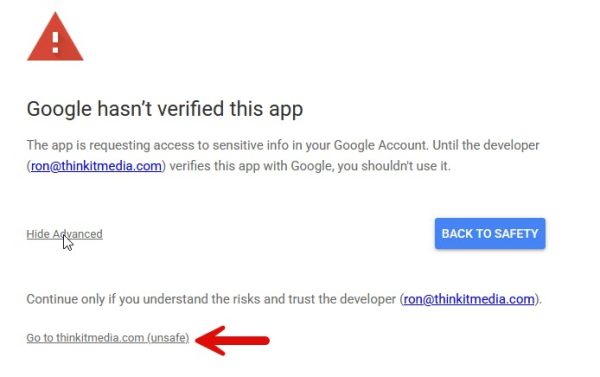
Step 2 – Google will show the app isn’t verified. They don’t require verification for mailers, so they instruct us to explain how to get it connected. Click the “Advanced” link.
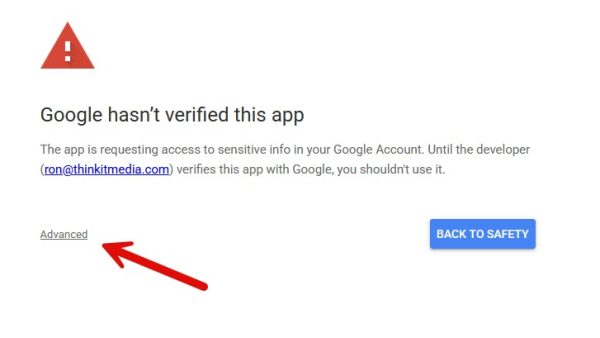
Step 3 – After clicking Advanced, click the “Go to thinkitmedia.com (unsafe)” link. There’s nothing unsafe; it’s just because they don’t verify plugins like this.
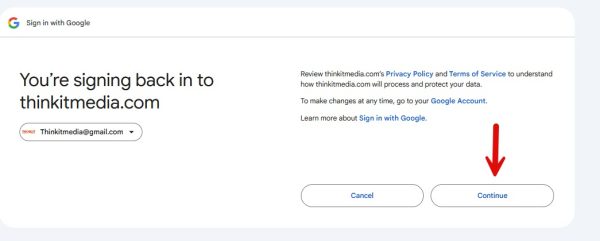
Step 4 – you will click the “Continue” button
Step 5 – Most of the time, you will just see 1 toggle, but sometimes there will be additional toggles. Just toggle all the checkboxes that appear and then click “Continue”.
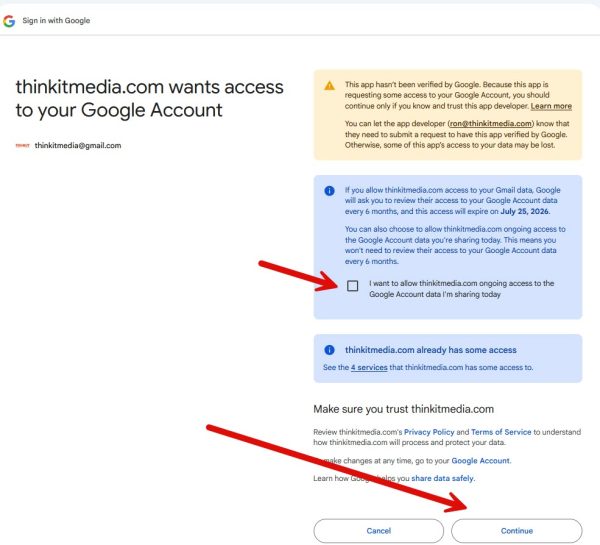
After clicking continue, you will be taken back to the settings screen, where you will see that your plugin is connected to your Gmail account. WordPress will now use your Gmail account to route form submission emails and any other emails your website sends behind the scenes. You are done!