
The campaign-first local SEO plugin for WordPress
More locations.Less busywork.
Build your local presence without building a bigger to-do list. Thinkit Local SEO Manager brings location pages, AI content, autoblogging, rankings, technical health, GBP tools, and FAQs into one connected WordPress workspace.
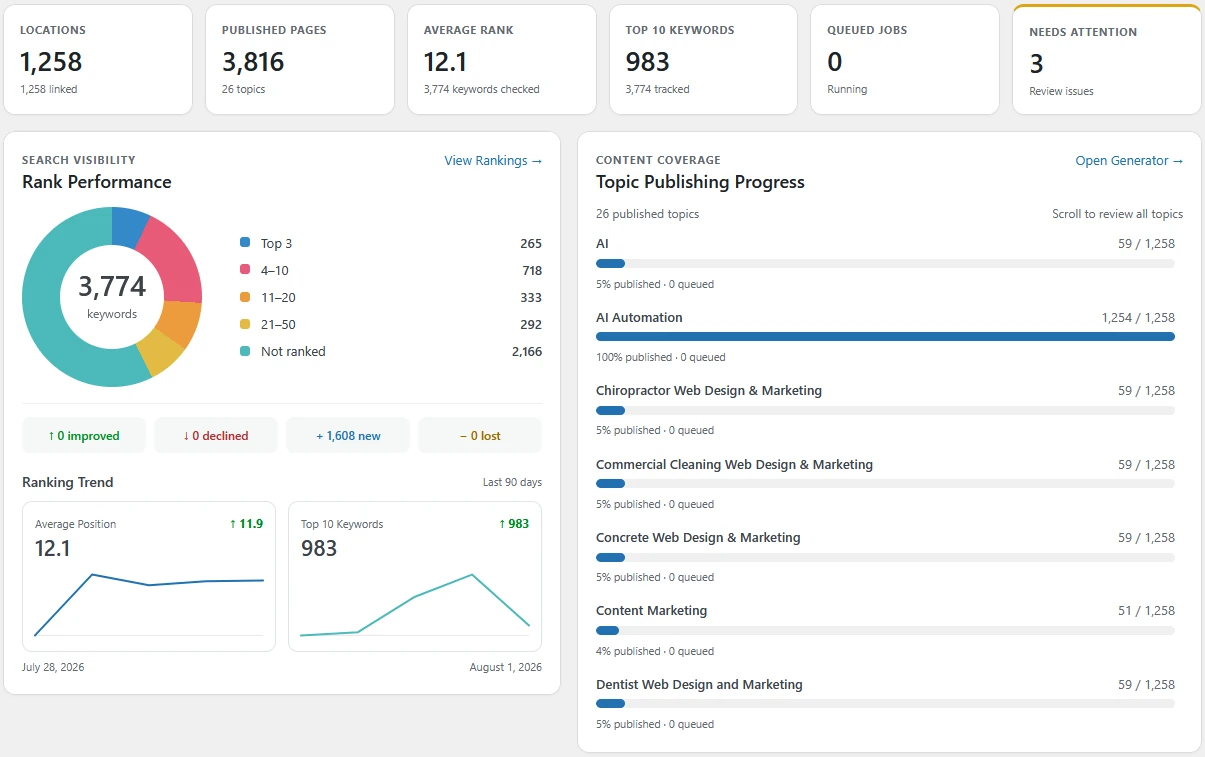
Results and interface details vary by site and version.
Less administration. More execution.
Your service area is growing.
Your workload shouldn’t grow with it.
A local campaign is more than a folder of pages. It is the locations, services, layouts, content, links, and follow-through that make those pages useful. Thinkit gives that work a home.
Stop rebuilding the same process.
Define the campaign, choose your locations, and reuse your templates. Keep the geographic structure connected to the pages it produces.
Automation with a clear direction.
Set the topic, vary the titles, and add specific instructions. Review generated work and use targeted regeneration instead of starting over.
Know where to focus next.
Open the dashboard to see ranking visibility, topic coverage, queued work, and issues. Go directly from the metric to the relevant workflow.
One connected local SEO workflow
Not another single-purpose plugin.
Bring the work of planning, publishing, measuring, and maintaining into the same campaign. Enable the modules you need and build a workflow around your business.
Campaign workspaces
Keep the whole campaign together.
Organize locations, topics, generated pages, and operational work by campaign. Use direct dashboard links to reach the generator, rankings, health, and other tools without hunting through menus.
Location Builder
Build around the places you actually serve.
Find cities around a city or postal center, choose miles or kilometers, preview the territory, and import selected locations. CSV/XLSX and manual imports let you specify the destination campaign.
International datasets
Your next market is not limited to the U.S.
Start with the included U.S. data or install a compatible country or World Cities CSV. Country-aware location records support state/province and optional county/region information.
AI city pages
Create local pages with a repeatable workflow.
Use the dedicated Create Pages workspace to queue location-specific pages by campaign, choose service topics and title variations, and add run-specific instructions. Shared AI Settings let you control the provider, model, fallbacks, and generation behavior without rebuilding the campaign.
Autoblogging
Keep publishing without rebuilding the process.
Create campaign-based autoblogging plans with topics, schedules, categories, queues, logs, retries, and featured images. Use the shared AI connection, review generated posts, and keep recurring content production inside the same Local SEO workspace.
AI Settings + Failover
Choose the AI stack that fits your workload.
Manage text and image providers from one AI Settings screen. Select supported models, configure up to three fallback providers, handle quota or outage cooldowns, and automatically pause or resume generation when provider limits are reached.
Generated images
Finish the page, not just the copy.
Generate and verify image attachments, review image status, and repair missing imagery separately from page text. Shared Image Instructions, no-text safeguards, and image verification help reduce unusable AI artwork before it reaches your templates.
Elementor + Avada
Keep your design. Localize the content.
Use reusable builder templates rather than redesigning every page. Native Thinkit Elementor Dynamic Tags and Avada/custom-field workflows connect the layout to localized content and generated images.
Rank Tracking
See what changed since the last check.
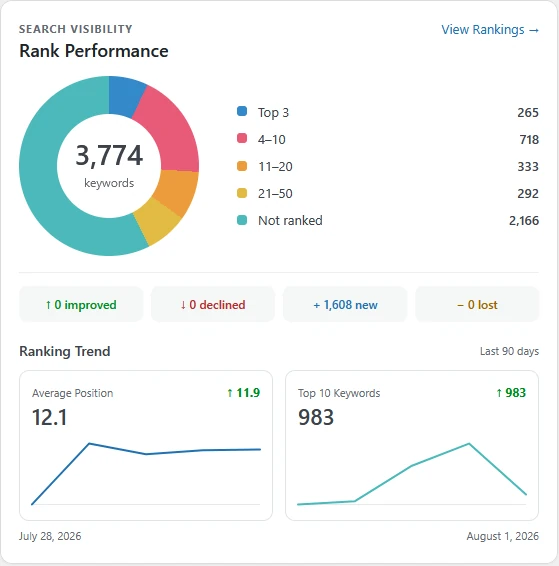
Track current and previous positions, ranking URLs, and keyword movement. Review ranking distribution and campaign trends, or request fresh checks for all tracked keywords or a selected group.
GBP Tools
Start with the real Google listing.
Search by business name, choose the correct public listing, and import its available details. Manage profiles, refresh Google data, record verification status, run audits, and plan posts from the campaign.
FAQ Plans
Turn customer questions into useful content.
Create campaign-owned plans with questions or keywords, categories, instructions, schedules, and optional model overrides. Generate answers through shared AI Settings, review them, and display one plan, multiple plans, or all published FAQs with reusable shortcodes and optional category navigation.
Internal Linking
Connect the pages you are building.
Manage relationships across city, county, state, and nearby-location pages. Linking and repair tools help maintain navigation through the geographic structure instead of leaving every page isolated.
Schema + Sitemaps
Keep technical tasks in the workflow.
Manage campaign-aware structured data and XML sitemaps for location pages. Review schema coverage, missing or stale records, sitemap eligibility, and related health checks from the plugin.
Health + Recovery
Find the next action, not another mystery.
Review page relationships, duplicate-location warnings, publishing progress, image verification, schema coverage, and generation activity. Follow the relevant workflow to investigate or repair what needs attention.
External integrations use your own provider accounts. API usage and third-party data licensing are separate. Google Places tools provide public listing data; direct GBP account management and publishing are not included in this release.
From service area to repeatable execution
A better process for every new location.
Build a campaign once. Give each location the content, design, and ongoing attention it needs.
Build the territory.
Choose your campaign, find a city or postal center, preview the radius, and import the locations that fit. Or bring your own location file.
Set the direction.
Select your Elementor or Avada source template, enter the service topic, choose title patterns, and add the instructions that make this run specific.
Queue and review.
Use Create Pages for location content, Autoblogging for recurring posts, and FAQ Plans for reusable answers. Run jobs in the background, inspect activity, and address incomplete work instead of guessing what happened.
Keep the campaign moving.
Follow ranking changes, expand topic coverage, maintain links and schema, and add useful FAQs. Your dashboard points you to the next task.
Target “Pool Repair” while directing the content toward structural cracks, shell damage, and restoration. The search term does not have to limit the service detail.
Measure the work, not just the output
A published page is a start.
Visibility is what you watch next.
Go beyond a count of pages created. Rank Tracking turns your keyword set into a working view of current visibility and movement.
- Current vs. previous. See the latest position, last-check movement, and ranking URL.
- Distribution and trends. Review Top 3, Top 10, and other ranking groups alongside campaign-level snapshots.
- Checks on your terms. Schedule due checks or request a fresh recheck for all or selected keywords.
- Keyword sets built for locations. Import keywords or generate combinations from campaign locations and service patterns.
Automated checks require DataForSEO. Rankings reflect the configured location code, language, device, and search depth; a keyword’s city label is not a map-grid rank scan.
More than landing pages
Bring local presence and helpful answers into the picture.
Your campaign does not end at the page. Manage the public business information customers find and create the answers they need before reaching out.
Find the listing.
Skip the retyping.
Search for a business, select its Google listing, and populate the available profile data. Keep a registry of real GBP profiles — not a fictional business listing for every city you target.
Verification and ownership are tracked separately. Places import does not verify a business, grant account access, or publish to Google.
Helpful questions.
A repeatable publishing plan.
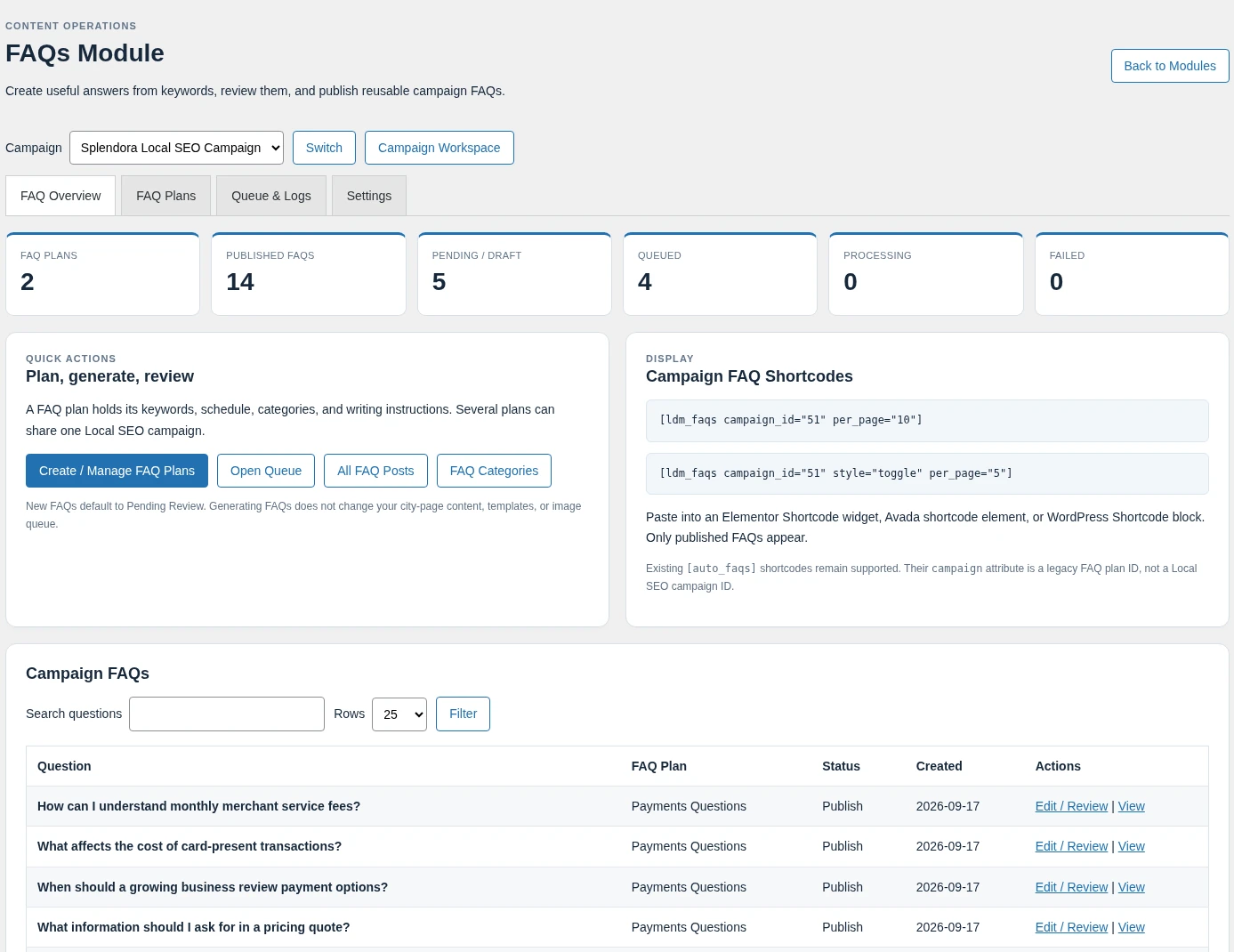
Build FAQ Plans around services and real customer questions. Set questions or keywords, categories, writing instructions, schedules, and optional model overrides, then review generated answers before adding published FAQs to your site.
FAQ generation uses the shared provider connection in AI Settings, with an optional model override per FAQ plan. FAQs remain separate records and appear where you place the shortcode.
Keep the foundation connected
Local SEO has moving parts.
Now they have a shared workspace.
Content needs structure. Structure needs maintenance. Keep those jobs visible as your campaign grows. City Pages, Autoblogging, and FAQs each use campaign-aware queues and logs so recurring content work stays visible and recoverable.
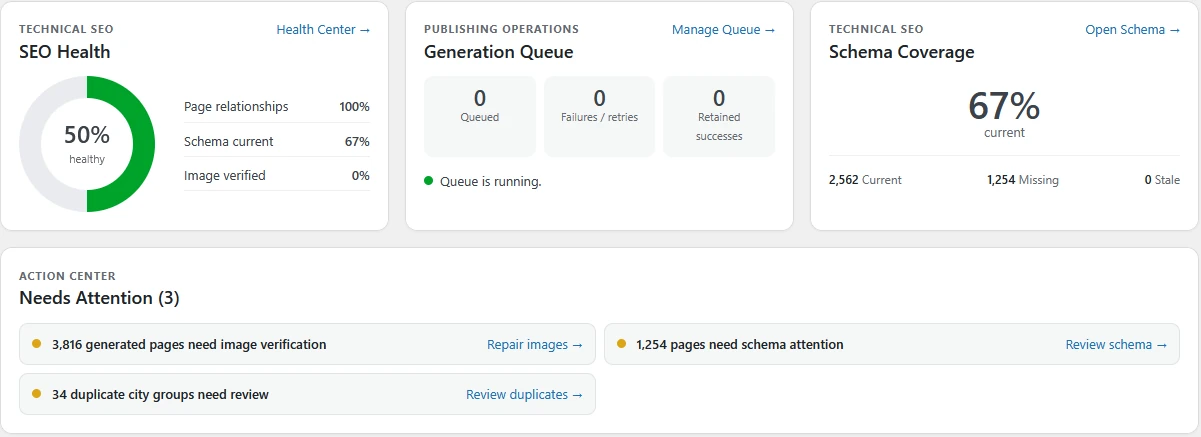
Actual interface with example campaign data. Health percentages describe plugin checks, not Google assessments or promised SEO results.
Connected geography
City, county, and state page tools help you organize the hierarchy. Internal-linking tools build and repair relationships between those pages.
Technical visibility
Monitor schema coverage and sitemap eligibility alongside location relationships. Review exceptions without leaving the campaign workspace.
Room to reorganize
Copy geography from another campaign or preview a move of eligible locations and linked city pages. Safeguards flag duplicates, queued work, and dependent records.
Help visitors find their service area.
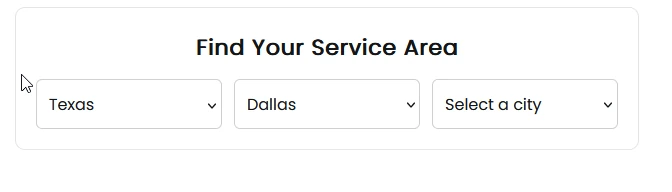
Add a location finder or directory shortcode with connected dropdowns and links to the relevant pages. Scope the experience to the appropriate campaign, then use appearance settings or your own CSS class to match the finder to the site design.
Built for the people doing the work
From your own service area
to your next client campaign.
Marketing agencies
Standardize the workflow across campaigns while keeping locations, content, and progress organized. Spend less effort finding the next task and more effort doing it.
Service-area businesses
Organize the markets you actually serve. Create service-focused local content without confusing an SEO target city with a physical business location.
In-house SEO teams
Use templates, shared campaign data, and operational dashboards to make recurring work easier to manage, review, and maintain inside WordPress.
Start with a campaign, not a blank spreadsheet
Your next market.
A clearer plan.
Start with a small, reviewed batch. Refine your template and instructions, then expand the workflow to the rest of your territory.
Install and activate.
Add Thinkit Local SEO Manager to WordPress, activate your license, and enable the modules you plan to use.
Connect and organize.
Use AI Settings to connect your preferred text and image providers, configure optional fallbacks, create the campaign, and import the locations you want to serve.
Prepare the template.
Choose Elementor or Avada, connect the dynamic fields, and set your service topics and content instructions.
Review, then expand.
Test a few pages, autoblog posts, and FAQs. Check accuracy, layout, links, and images before running larger batches and following campaign progress.
Before you get started
Good questions.
Clear answers.
What is included, what needs a separate account, and how the plugin fits your WordPress workflow.
What is Thinkit Local SEO Manager?
Thinkit Local SEO Manager is a WordPress plugin for organizing and running location-based SEO campaigns. It brings together campaign locations, AI-assisted city pages, autoblogging, generated images, reusable templates, internal linking, schema, sitemaps, rank tracking, Google Business Profile tools, and FAQ publishing in one administration area.
Does it work with Elementor and Avada?
The city-page generator supports both Elementor and Avada/Fusion template workflows. Elementor users can use Thinkit Dynamic Tags for fields such as city, service, headings, body content, and generated images. Builder licenses and any premium builder capabilities are separate. Test your source template before generating a large batch.
Are AI generation and other API costs included?
Connect your own provider accounts for the integrations you use. AI Settings supports multiple text and image providers, plus optional text-provider fallbacks. AI content and image generation require provider access and available credits; automated ranking checks use DataForSEO; public business-listing search uses Google Places API. Provider fees, quotas, billing, and access requirements are separate from the plugin purchase.
Can I create campaigns outside the United States?
Yes. A U.S. city dataset is included, and Location Builder accepts compatible country-specific CSV files or a multi-country World Cities dataset. Install your chosen data, select the country, and build from the available locations. Coverage and geographic detail depend on your uploaded dataset; third-party license and attribution requirements still apply.
Does the GBP module publish directly to Google?
Not in this release. Google Places supports public listing search, import, and refresh. Thinkit adds profile management, audits, verification tracking, and post planning. Direct account-connected publishing, review responses, and Google Business Profile OAuth management are not included in the current workflow.
Do FAQs automatically appear on every city page?
No. FAQ Plans belong to a campaign, and generated FAQs can be reviewed before publishing. Add a shortcode where the answers should appear. You can display one plan, a selected list of plans, or all published FAQs, with toggle/accordion layouts, compact pagination, and optional plan-category navigation across the top.
What does the Autoblogging module do?
Autoblogging lets you create recurring content plans inside Local SEO Manager. Each plan can carry its own topics, categories, schedule, publishing behavior, queue, and logs while using the shared AI Settings connection. It is designed for ongoing blog production rather than location-page generation.
Can I retry work without rebuilding a whole campaign?
The generation workspace includes page regeneration, image-only generation and verification, queue controls, and activity logs. Image-only repair leaves page copy untouched. The actions available depend on the record and job state; older legacy failure records may not expose the same retry controls as new jobs.
Does the plugin guarantee rankings or leads?
No. Thinkit provides tools to organize, create, maintain, and measure local SEO work; it does not guarantee indexing, rankings, rich results, leads, or revenue. Review AI-generated copy for accuracy and make each location page useful to the people it serves. Campaign health percentages are internal operational indicators, not Google scores.
What should I have ready before getting started?
Have a WordPress site with installation access, the applicable Thinkit license, a clear service area, and your page template. Add credentials only for the external integrations you intend to use. Hosting resources, background-task scheduling, provider response times, and campaign size affect generation throughput.
Build your next campaign with a better system
Less tool-hopping.
More forward progress.
Bring your locations, content, rankings, and ongoing local SEO work together. Make Thinkit Local SEO Manager the place your campaign runs.
Thinkit Local SEO Manager
Your campaign-first local SEO, AI content, autoblogging, and reporting workspace for WordPress.
View pricing & get startedSee the product purchase options for current pricing, billing terms, and license coverage. Third-party API usage is separate. No ranking or revenue guarantees.